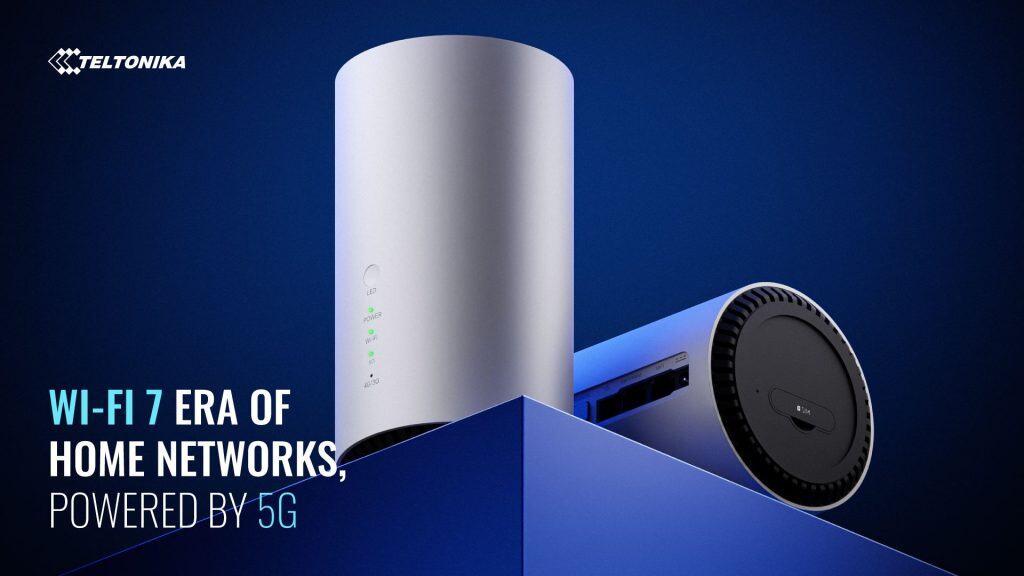

Teltonika has spent two decades building routers that keep cash machines online, monitor wind turbines, and connect fleet vehicles across continents. Now they’ve taken that industrial engineering philosophy and put it in a box designed to sit next to your television.
The result is ALTOS — a 5G Fixed Wireless Access router that looks like something your ISP might send you, but behaves like equipment you’d find in a data centre. It’s an interesting product that raises an obvious question: does home broadband really need industrial-grade engineering?
This guide examines ALTOS in detail — what it does, who it’s actually for, and whether the industrial heritage translates into real-world benefits for homes and small businesses stuck in the “fibre gap”.
Contents
- What Is the Teltonika ALTOS?
- Key Specifications
- The Industrial IoT Heritage (And Why It Matters)
- Who Is ALTOS Actually For?
- ALTOS vs Carrier-Provided 5G Routers
- Features Explained: What You Get and Why
- The Antenna Reality: SINR, Cable Loss, and Why “More” Can Mean “Worse”
- The Awkward Questions Answered
- The Web Interface and Configuration
- Installation Tips for Best Performance
- Final Verdict: Should You Buy It?
- Frequently Asked Questions
What Is the Teltonika ALTOS?
ALTOS (model CAP700) is Teltonika’s first router designed specifically for the home and small office Fixed Wireless Access market. It combines:
- 5G SA/NSA connectivity with theoretical speeds up to 4 Gbps download
- Wi-Fi 7 (802.11be) for next-generation local wireless
- 2.5 Gigabit Ethernet for wired devices that need serious bandwidth
- RutOS — Teltonika’s enterprise operating system used across their industrial range
- RMS compatibility — remote management typically used for fleet deployments
The target use case is straightforward: reliable broadband for locations where fibre isn’t available, is too expensive to install, or takes too long to deploy. Think rural homes, rented properties, new builds waiting for infrastructure, home offices, and small businesses that need internet today rather than “sometime in the next six months”.
Key Specifications
| Feature | Specification |
|---|---|
| Model | CAP700 |
| 5G Performance | Up to 4.0 Gbps down / 900 Mbps up (SA/NSA) |
| 4G Fallback | LTE Cat 19: up to 1.6 Gbps down / 200 Mbps up |
| 3G Fallback | Up to 42 Mbps down / 5.76 Mbps up |
| Wi-Fi | Wi-Fi 7 (802.11be) Dual-band |
| Ethernet Ports | 1× 2.5GbE + 1× 1GbE |
| SIM Support | Single Nano SIM (no eSIM) |
| External Antenna Ports | 2× SMA (MAIN + DIV for 2×2 MIMO) |
| Phone Port | 1× RJ11 (not currently enabled — reserved for future firmware) |
| USB | Micro-USB Type-B (USB 2.0) |
| Operating Temperature | 0°C to 40°C |
| Protection Rating | IP30 (indoor use only) |
| Operating System | RutOS |
| Remote Management | Teltonika RMS compatible |
| Dimensions | Compact desktop form factor |
Supported 5G/LTE Bands (EMEA Version)
- 5G NR: n1, n3, n5, n7, n8, n20, n28, n38, n40, n41, n71, n75, n76, n77, n78, n79
- LTE: B1, B3, B5, B7, B8, B20, B28, B32, B38, B40, B41, B42, B43, B71
- UMTS: B1, B3, B5, B8
Physical Interfaces

The Industrial IoT Heritage (And Why It Matters)
To understand ALTOS, you need to understand where Teltonika comes from. This isn’t a consumer electronics company that decided to make a 5G router. Teltonika Networks builds connectivity equipment for:
- ATM and payment terminal networks
- Remote solar and wind farm monitoring
- Fleet management and vehicle tracking
- Smart city infrastructure
- Industrial automation and SCADA systems
- Railway and transportation networks
Their routers are deployed in environments where “it stopped working” isn’t an inconvenience — it’s a costly failure. This background shapes every design decision in ALTOS.
What Industrial Heritage Means in Practice
Stability over features: Consumer routers often prioritise flashy features. Industrial routers prioritise not crashing. RutOS has been refined across thousands of deployments where uptime matters.
Diagnostic depth: When something goes wrong with a consumer router, you get a vague error message. ALTOS gives you detailed signal metrics, connection logs, and diagnostic tools because industrial deployments require root cause analysis.
Long-term support: Consumer routers often get abandoned after a year or two. Teltonika’s industrial customers demand long-term firmware support and security updates.
Remote management: The RMS (Remote Management System) integration exists because industrial deployments involve managing hundreds or thousands of devices remotely. For a home user, this means your IT-savvy relative can troubleshoot your router without driving to your house.
Who Is ALTOS Actually For?
Let’s be specific about who benefits from ALTOS and who should probably look elsewhere.
ALTOS Makes Sense If You:
- Need broadband where fibre isn’t available — rural areas, new developments, areas with poor copper infrastructure
- Want to avoid carrier lock-in — buy the hardware outright and choose any 5G SIM provider
- Value stability over peak speed — you’d rather have consistent 200 Mbps than spiky 500 Mbps
- Need proper networking features — VLANs, VPN server/client, firewall rules, static routing
- Run a small business — the professional features and remote management justify the price
- Want the 2.5GbE port — for NAS access, workstation connectivity, or switch uplinks
- Already use Teltonika equipment — ecosystem consistency and familiar management interface
ALTOS Probably Isn’t For You If:
- You want the cheapest possible 5G router — ZTE and Huawei consumer units cost significantly less
- You need working voice/phone functionality right now — the RJ11 port is not currently enabled
- You need eSIM support — ALTOS uses physical Nano SIM only
- You need outdoor mounting — it’s indoor-only (IP30, 0-40°C operating range)
- You expect plug-and-play simplicity — the interface is more powerful but less “consumer-friendly”
ALTOS vs Carrier-Provided 5G Routers
When you sign up for 5G home broadband with carriers like EE, Three, or Vodafone, they typically supply a ZTE, Huawei, or Nokia router as part of the package. How does ALTOS compare?
| Feature | Teltonika ALTOS | Typical Carrier Router (ZTE/Huawei) |
|---|---|---|
| Wi-Fi Standard | Wi-Fi 7 | Wi-Fi 6 |
| 2.5GbE Port | Yes | Usually no (2× 1GbE typical) |
| External Antenna Option | 2× SMA ports | Varies (some have TS9, some have none) |
| VPN Server/Client | Full support (OpenVPN, WireGuard, IPsec) | Basic or none |
| Firewall | Enterprise-grade, fully configurable | Basic |
| VLANs | Full support | Usually none |
| Remote Management | RMS platform (professional) | Basic web UI only |
| Signal Diagnostics | Detailed (RSRP, RSRQ, SINR, band info) | Basic signal bars |
| Firmware Updates | Direct from Teltonika, long-term support | Carrier-controlled, often delayed |
| Contract Lock-in | None — buy outright, use any SIM | Usually tied to carrier contract |
| Typical Price | £280-350 outright | “Free” with contract (or £150-250 retail) |
The Real Difference
Carrier-provided routers are designed to be “good enough” for most people and cheap enough to give away with contracts. ALTOS is designed for people who need more control, more reliability, or specific features that consumer routers don’t offer.
If you just want basic 5G broadband and don’t care about networking features, a carrier bundle is probably fine. If you want to own your equipment, choose your provider freely, or need professional networking capabilities, ALTOS justifies the higher upfront cost.
Features Explained: What You Get and Why
RutOS: The Operating System
ALTOS runs RutOS — the same operating system used across Teltonika’s industrial router range. This isn’t a stripped-down consumer firmware; it’s the full professional platform.
What this means for you:
- Comprehensive web interface with detailed configuration options
- CLI (command line) access for advanced users
- Lua scripting for automation
- Regular security updates from Teltonika directly
- Extensive documentation in the Teltonika Wiki
Wi-Fi 7 (802.11be)
ALTOS is one of the first 5G FWA routers with Wi-Fi 7 support. The practical benefits:
- Multi-Link Operation (MLO): Devices can use multiple frequency bands simultaneously
- 4K QAM: Higher data encoding efficiency
- Reduced latency: Better for video calls, gaming, and real-time applications
- Better multi-device handling: More efficient when many devices are connected
For most home users, the immediate benefit is that Wi-Fi 7 handles congestion better. When multiple people are streaming, video calling, and gaming simultaneously, the local wireless network is often the bottleneck — not the 5G connection.
2.5 Gigabit Ethernet
One of ALTOS’s Ethernet ports is 2.5GbE rather than standard Gigabit. This matters if you have:
- A NAS (network storage) that supports faster-than-gigabit speeds
- A workstation with a 2.5GbE network card
- A managed switch with 2.5GbE uplink
- Any scenario where Gigabit Ethernet is the bottleneck
For most home users, this is future-proofing. For small businesses or power users, it’s immediately useful.
VPN Support
ALTOS supports multiple VPN protocols as both server and client:
- OpenVPN — widely compatible, well-documented
- WireGuard — modern, fast, efficient
- IPsec/IKEv2 — enterprise standard
- PPTP/L2TP — legacy support
Practical uses:
- Secure remote access to your home network
- Site-to-site VPN for small business with multiple locations
- Routing all traffic through a commercial VPN service
- Secure connection for remote workers
Security Features
The security stack reflects industrial requirements:
- Firewall: Zone-based, fully configurable rules
- WPA3: Latest Wi-Fi security standard
- Access control: MAC filtering, guest networks, client isolation
- HTTPS management: Secure web interface access
- SSH access: Encrypted command-line management
- Automatic security updates: Via RutOS firmware updates
Industrial Protocols (MODBUS, BACnet, etc.)
You’ll notice ALTOS supports industrial protocols like MODBUS, BACnet, OPC UA, and DNP3. If you’re a home user, you’re probably wondering why.
The simple answer: RutOS is a shared platform across Teltonika’s product range. Rather than building a separate “consumer” firmware, they use the same robust codebase. The industrial protocol support is simply there — you don’t have to use it, and it doesn’t affect performance or security.
The benefit: You get a mature, battle-tested operating system rather than a hastily-assembled consumer firmware. The features you don’t use subsidise the stability of the features you do.
The Antenna Reality: SINR, Cable Loss, and Why “More” Can Mean “Worse”
ALTOS has two external SMA antenna ports. Before you rush to buy external antennas, read this section carefully — it could save you money and frustration.
The Myth
“If I add an external antenna, the signal will be stronger, so performance must improve.”
This assumption feels logical. It is frequently wrong.
What Antennas Actually Do
Antennas do not amplify signal. They:
- Receive radio waves from a different physical location
- Shape how those waves are captured (directionality, polarisation)
- Pass the signal to the modem — unchanged except for cable losses
If the new location has cleaner signal and less interference, performance improves. If it doesn’t, performance can decrease even while signal bars increase.
SINR: The Metric That Actually Matters
Most people watch RSRP (signal strength — what your “bars” represent). The modem cares more about SINR (Signal to Interference plus Noise Ratio) — the quality of the signal relative to background noise.
| SINR (dB) | Quality | Typical Result |
|---|---|---|
| >20 | Excellent | Maximum speeds, stable connection |
| 13-20 | Good | Good speeds, reliable |
| 0-13 | Poor | Reduced speeds, possible instability |
| <0 | Bad | Interference exceeds signal |
Key insight: You can have strong RSRP (good bars) and terrible SINR (poor quality). This is exactly what happens with many external antenna installations.
How External Antennas Make Things Worse
1. Cable Loss
Every metre of coaxial cable attenuates your signal. At 5G frequencies (3.5 GHz), typical cable loses 3-4 dB over a 10-metre run. This loss affects the wanted signal more than interference, directly degrading SINR.
Result: Signal strength looks similar. Signal quality drops. Speeds drop.
2. Loss of Spatial Diversity
ALTOS uses multiple internal antennas that are physically separated and differently polarised. This provides spatial diversity — the modem exploits multiple signal paths. External antennas mounted close together with identical polarisation collapse this diversity.
3. Building Fabric Blocking Interference
Your building doesn’t just block wanted signal — it also blocks interference from neighbouring cells and other sources. An external antenna may pick up more of everything, including interference, while the internal antenna has a cleaner (if weaker) view.
4. Directional Antennas Amplifying Problems
In urban areas, a directional antenna pointed at the serving cell often also captures interference from cells in the same direction. RSRP improves. SINR drops. Speeds tank.
When External Antennas Actually Help
External antennas are justified when:
- The router cannot be placed where signal quality is good (internal room, metal cabinet)
- Building fabric severely attenuates RF (thick stone, metal cladding, foil insulation)
- SINR improves at the antenna location, not just RSRP
- Cable runs are short and use high-quality, low-loss cable
Tip: The correct first step is always repositioning the router, not buying antennas. Moving the unit 50cm can outperform £300 of antenna installation.
The Awkward Questions Answered
Why No eSIM?
ALTOS uses a physical Nano SIM slot only. No eSIM support.
Why: FWA deployments typically involve “router + SIM” bundles through carriers or ISPs. Physical SIM logistics are standard practice. eSIM adds provisioning complexity that matters more in industrial IoT deployments (where Teltonika already offers it in other products like the RUTM54/55).
Bottom line: If eSIM is essential for your use case, look at the RUTM54 or RUTM55 instead.
Why Only 2 External Antenna Ports?
ALTOS exposes 2×2 MIMO externally (MAIN + DIV) rather than 4×4.
Why: This is deliberate design, not cost-cutting. The internal antennas are distributed for optimal spatial diversity. Exposing 4×4 external connections would massively increase installation mistakes — wrong antennas, poor spacing, excessive cable loss. Two ports provides a “signal relocation” option for difficult installs without inviting self-inflicted problems.
What About the Phone Port?
ALTOS has an RJ11 telephone port. Here’s what Teltonika has confirmed:
“The RJ11 port currently has no functionality and is reserved for future applications that are still under development. Its functionality will be activated through a firmware update once available. At this time, the port remains unused.”— Teltonika Networks
Translation: Do not buy ALTOS expecting to connect a phone. The hardware exists; the functionality does not. If voice capability arrives via firmware update, consider it a bonus.
Why Does a Home Router Have MODBUS?
ALTOS runs RutOS — the same operating system used across Teltonika’s industrial range. Industrial protocol support (MODBUS, BACnet, OPC UA) is inherited from that shared codebase.
For home users, these features are invisible and irrelevant. For MSPs deploying ALTOS alongside industrial Teltonika equipment, it’s ecosystem consistency. The presence of unused features doesn’t negatively impact home use — it just means you’re running a proven, mature platform.
The Web Interface and Configuration
The RutOS web interface reflects Teltonika’s industrial heritage — comprehensive rather than simplified.
Dashboard
The main dashboard shows:
- Connection status and type (5G/LTE/3G)
- Signal metrics: RSRP, RSRQ, SINR (not just “bars”)
- Connected band and cell information
- Data usage statistics
- Connected clients (wired and wireless)
- System resource usage
Mobile Configuration
Detailed control over the cellular connection:
- APN configuration (auto or manual)
- Network mode selection (5G/LTE/3G preferences)
- Band locking (force specific bands)
- Cell locking (force specific cell towers)
- Connection monitoring and auto-reboot on failure
Network Configuration
- DHCP server with reservations
- Static routing
- VLAN configuration
- Port forwarding
- DMZ
- DNS settings (custom DNS servers, local DNS)
Security
- Firewall zone configuration
- Traffic rules (allow/deny/forward)
- Access control lists
- Intrusion prevention
Services
- VPN server/client (OpenVPN, WireGuard, IPsec)
- Dynamic DNS
- Wake on LAN
- NTP (time synchronisation)
- SMS utilities (send/receive via the cellular module)
Tip: If the interface seems overwhelming, Teltonika’s Wiki documentation is extensive. Most configuration tasks have step-by-step guides.
Installation Tips for Best Performance
Positioning
- Start near a window facing the nearest cell tower. Use CellMapper or your carrier’s coverage map to identify tower locations.
- Elevate the router — higher positions typically receive better signal.
- Avoid metal obstructions — filing cabinets, radiators, metal window frames all degrade signal.
- Test multiple positions before committing to a permanent location.
Using the Signal Metrics
Don’t just look at “bars”. Check the actual values in the web interface:
- RSRP: Signal strength. -80 dBm is excellent, -100 dBm is weak, below -110 dBm is poor.
- RSRQ: Signal quality. -10 dB is good, -15 dB is acceptable, below -20 dB is poor.
- SINR: Signal-to-noise ratio. Above 20 dB is excellent, 10-20 dB is good, below 0 dB is problematic.
Priority: SINR matters most for actual throughput. A position with weaker signal (lower RSRP) but higher SINR will often outperform a stronger but noisier signal.
Band Selection
If you’re getting inconsistent performance, try locking to specific bands via the mobile configuration. In the UK:
- n78 (3.5 GHz): Primary 5G band, best speeds but shorter range
- n28 (700 MHz): Better penetration through buildings, lower speeds
- n1/n3: Re-farmed LTE spectrum for 5G, varies by carrier
Experiment with band preferences to find the best combination for your location.
External Antennas (If Necessary)
If repositioning the router doesn’t achieve adequate signal quality:
- Confirm that SINR (not just RSRP) is the problem
- Use the shortest possible cable runs
- Choose quality low-loss cable (LMR-400 or equivalent)
- Ensure correct polarisation (cross-polarised antennas for MIMO)
- Test before permanent installation
Final Verdict: Should You Buy It?
ALTOS occupies an interesting position: industrial-grade engineering in a consumer form factor, priced between cheap carrier routers and professional equipment.
Buy ALTOS If:
- You want to own your equipment and avoid carrier lock-in
- You need VPN, VLAN, or advanced networking features
- You value stability and long-term support over the lowest price
- You want detailed signal diagnostics and configuration control
- You need the 2.5GbE port for fast local networking
- You run a small business or home office with professional requirements
Don’t Buy ALTOS If:
- You want the cheapest possible 5G broadband solution
- You need working voice/phone functionality today
- You need eSIM support
- You need outdoor mounting
- You prefer plug-and-play simplicity over configuration options
The Bottom Line
ALTOS is what happens when a company that builds routers for ATMs, wind farms, and railway systems decides to address the home broadband market. The industrial heritage shows in the feature depth, the diagnostic capabilities, and the configuration options that consumer routers simply don’t offer.
Whether that’s worth the premium over a carrier-provided ZTE depends on what you need. For basic broadband, probably not. For anyone who’s ever been frustrated by the limitations of consumer networking equipment, ALTOS offers a genuine alternative.
Frequently Asked Questions
Does the Teltonika ALTOS support eSIM?
No. ALTOS uses a physical Nano SIM slot only. If you need eSIM support, consider the Teltonika RUTM54 or RUTM55 models instead.
Does the phone port on ALTOS work?
No. Teltonika has confirmed that the RJ11 port currently has no functionality and is reserved for future applications. It may be enabled via a future firmware update, but there is no timeline.
Can I use ALTOS with any 5G SIM card?
Yes. ALTOS is unlocked and works with any compatible 5G SIM. In the UK, this includes EE, Three, Vodafone, O2, and MVNOs that offer 5G data plans.
Why does ALTOS only have 2 external antenna ports?
ALTOS has multiple internal antennas optimised for performance. The two external SMA ports (MAIN and DIV for 2×2 MIMO) are provided as a fallback for installations where the router cannot be positioned for adequate signal. This design prevents common installation mistakes associated with 4×4 external antenna setups.
Is ALTOS better than the router EE/Three/Vodafone provides?
It depends on your needs. ALTOS offers more advanced features (VPN, VLANs, detailed diagnostics, 2.5GbE), longer-term support, and carrier independence. Carrier-provided routers are simpler and cheaper (often “free” with contracts). For basic broadband, carrier routers are adequate. For professional networking needs, ALTOS is significantly more capable.
Can ALTOS be used outdoors?
No. ALTOS is rated IP30 with an operating temperature of 0-40°C, designed for indoor use only. For outdoor installations, consider Teltonika’s OTD series outdoor routers.
What is RutOS?
RutOS is Teltonika’s proprietary operating system based on OpenWrt. It powers their entire router range, from industrial gateways to ALTOS. It provides a comprehensive web interface, CLI access, and features typically found in enterprise networking equipment.
What is Teltonika RMS?
RMS (Remote Management System) is Teltonika’s cloud platform for managing routers remotely. It allows configuration, monitoring, firmware updates, and troubleshooting without physical access. Originally designed for industrial fleet management, it’s useful for home users who want remote access or have someone else managing their network.
Why does ALTOS have MODBUS support?
ALTOS runs RutOS, the same operating system used across Teltonika’s industrial router range. Industrial protocol support (MODBUS, BACnet, OPC UA) is inherited from that shared codebase. Home users can ignore these features entirely — they don’t affect performance or security.
Will adding an external antenna improve my speeds?
Not necessarily. External antennas relocate where the signal is received — they don’t amplify it. Cable losses, reduced spatial diversity, and increased interference pickup can actually reduce performance. Always try repositioning the router first. Only add external antennas if SINR (signal quality) is demonstrably better at the antenna location, and use short, high-quality cables.
Last updated: January 2025
Sources: Teltonika Networks official documentation, direct manufacturer communication, distributor specifications