

If you install cellular routers for a living, you’ve probably fought the same battle a hundred times. The best signal lives outside, often high on a wall or mast, but the router sits indoors because that’s where the mains, the switch, and the customer are. So you run long coax up to an outdoor antenna, lose precious dB in the cable, and then wonder why the shiny new 5G router performs like a tired 3G dongle.
GTT Wireless exists to flip that setup on its head. Their weatherproof “router-inside” enclosures put the electronics where the RF is strongest, then bring a single Ethernet cable back to the network using PoE. It is a simple idea that solves several recurring problems at once: signal quality, installation time, cable losses, and ongoing maintenance.
This profile covers who GTT Wireless are, what they sell, how their approach differs from the traditional “indoor router plus outdoor antenna” model, where it sits against alternatives such as QuWireless, and why outdoor mounting pairs perfectly with eSIM. We also map the concept to real hardware people actually use in the field, including Teltonika, Robustel, Digi, and Raspberry Pi with cellular HATs.
Who are GTT Wireless
GTT Wireless design and manufacture outdoor-rated enclosures and integrated antenna kits for routers, modems, gateways, and embedded boards. The emphasis is practical: IP67 or better environmental protection, “fit and forget” hardware, and RF performance that avoids the usual coax compromises. Their catalogue covers lightweight polycarbonate boxes as well as more heavy-duty die-cast options, with integrated 2×2 MIMO omni antennas that cover 4G, LTE, 5G, Wi-Fi, Bluetooth, and optional GNSS. They also provide the little things that make installs painless: gland kits, pigtails, RJ45 feed-throughs, and mounting hardware that suits poles or walls.
Two names you will see across their range are pSmart-Box and mSmart-Box. Think of these as families of “router-ready” outdoor housings. Kits are available pre-matched to popular devices, for example Teltonika RUT901 or RUT956 on the 4G side and RUTX50 or RUTC50 for 5G. There is also a Raspberry Pi development enclosure with a universal mounting plate that takes Pi boards and cellular HATs. The common thread is speed of deployment. Put the router in the box, connect very short internal pigtails to the integrated MIMO antenna, power the unit via PoE, and run one Ethernet back to the indoor network.
For engineers, the main value is not the plastic. It is the RF geometry. Short pigtails inside the box and almost zero external coax mean you preserve the signal you fought to find.
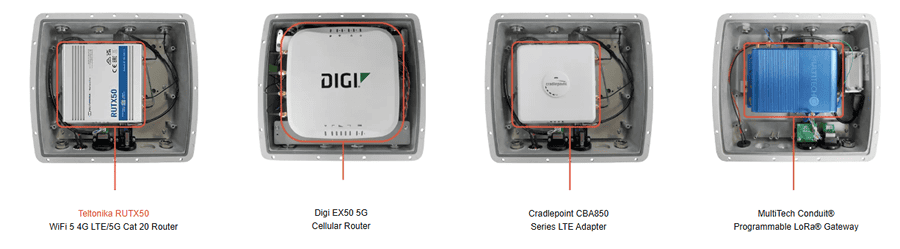
What they sell: the quick map
GTT’s product families are easy to understand if you think in terms of use-case rather than part numbers.
- Outdoor omni enclosure kits for specific routers
Pre-cut and pre-drilled IP67 boxes sized for devices such as Teltonika RUT901, RUT956, RUTX50, and RUTC50. Integrated 2×2 MIMO omnidirectional antenna covers 4G through to 5G, with dual-band Wi-Fi and optional GPS. These are the “just add router” kits many installers want for CCTV and building services. - Universal omni enclosure kit
Same principle, but with a universal plate that takes a range of compact industrial routers or small SBCs. Useful when you standardise the enclosure and vary the electronics, or when you use non-Teltonika gear such as Robustel or Digi. - Raspberry Pi outdoor development kit
An IP67 enclosure with MIMO omni antenna and a universal plate for Pi and common HATs, including cellular mini-PCIe or M.2 modules. Ideal for site-based monitoring projects, environmental sensing, LoRaWAN bridges, or prototyping edge gateways that will later be hardened. - Standalone outdoor antennas and accessories
Omni options for cellular and Wi-Fi, plus glands, pigtails, and connectorised bits so you can tweak a build without hunting three suppliers.
The shared spec hallmarks are IP67 sealing, UV-stable materials, integrated 2×2 MIMO for cellular, dual-band Wi-Fi support, and PoE-friendly layouts. In other words, the boxes are designed to live outside for years, not months.
Why put the router outdoors
You do it for physics, not fashion. Cellular links are SNR-limited long before they are feature-limited. Every decibel you lose in coax is a decibel you cannot use for throughput, modulation depth, or uplink stability. And the uplink is the silent killer for CCTV and telemetry. You can often download at acceptable rates despite poor RF. Uploads, event pushes, and VPN tunnels suffer first.
Let’s talk losses in plain numbers. Coax attenuation scales with frequency and cable type. Thin, flexible cables like RG58 have meaningful loss in the LTE and 5G bands. Even “low loss” options still bite once lengths get silly.
- RG58
Typical attenuation is on the order of 13 to 18 dB per 30 metres around 800 to 2400 MHz. Stretch that to 10 metres on a roof run and you are still burning multiple dB before the signal even hits the radio. Add connectors and bends and you are worse off. - LMR-400
Much better, roughly 4 to 7 dB per 30 metres in the same bands. But it is thicker, heavier, more expensive, and not fun to route in tight conduits. Ten metres plus a couple of connectors still eats meaningful dB, particularly at 1800 to 2600 MHz and into 5G NR bands.
Stack that with real-world factors: water ingress at connectors, kinks from rushed installs, and simple mechanical stress. You never get textbook performance once the ladder goes back on the van.
When you place the radio itself in a weatherproof enclosure at the mast point and couple it to an integrated MIMO antenna via very short internal pigtails, you stop most of that waste. Then you export power and data on a single Ethernet cable using PoE. For routers that accept PoE-in natively, you are done. For those that do not, a PoE splitter inside the enclosure converts to the router’s DC barrel or terminal block. Either way, your long run is copper for Ethernet, not RF.
Net effect
Better RSRP and RSRQ, cleaner SINR, higher and more stable uplink, and fewer “mystery” speed swings due to wet cables or oxidised crimps. In CCTV, that means fewer dropped frames and fewer support tickets about remote access “being flaky on Fridays”.
How GTT’s approach compares to the traditional indoor router plus outdoor antenna
The traditional pattern remains useful in two cases:
- short cable runs where the router must be indoors for policy reasons
- directional high-gain installs where the antenna gain outweighs the feeder loss
For everything else, long coax is often the wrong answer.
Indoor router + outdoor antenna pros
- Router sits in a conditioned space
- Easy physical access to SIM tray and ports
- Directional antennas with serious gain are available and, when correctly aimed, can unlock marginal sites
Cons
- Cable loss eats SNR, often more on uplink than you realise
- Coax, connectors, and weatherproofing add time and failure points
- Aesthetic issues when customers dislike fat feeders on facades
- Dual 2×2 MIMO runs double the pain, and 4×4 MIMO is rarely practical
Outdoor router in an enclosure pros
- Negligible RF loss from pigtail to antenna
- PoE backhaul is cheap, standard, and often pre-run by the electrician
- Integrated solutions are faster to mount and seal
- True MIMO geometry preserved, less risk of installers mixing a paddle and an external element by mistake
Cons
- Physical access for SIM cards and resets is now up the ladder
- Temperature range and condensation must be designed for
- If you need extreme directional gain, you may still choose a separate external panel or yagi
With GTT’s omni enclosures you are optimising for quick, robust, general-purpose deployments: retail and leisure sites, outbuildings, containers, cabins, car parks, temporary venues, and roofs where line-of-sight varies. If your requirement is a fixed rural site with known mast azimuth and distance, a high-gain directional solution can still win. You can combine approaches too: mount the router outdoors and use short jumpers to a dedicated directional panel.
Where this fits for Teltonika, Robustel, Digi, and others
Teltonika
GTT supply enclosure kits tailored to the workhorses most UK engineers know: RUT901 and RUT956 on the 4G side, and RUTX50 or RUTC50 for 5G. The internals are laid out to match these devices physically, with thought given to pigtail routing for 2×2 MIMO cellular and dual-band Wi-Fi. If you standardise on Teltonika in estates of EV chargers, kiosks, forecourts, or temporary events, these kits make roll-outs predictable.
Robustel
Most Robustel LTE and 5G models in the compact class fit universal plates without drama. Check height for units with top-mounted connectors and watch total current draw if you plan to feed the whole thing from 802.3af rather than 802.3at. A simple PoE budget check up front avoids surprises.
Digi
Digi’s IX and EX families are also a good mechanical match. The same comments apply about connector orientation and PoE limit. If you rely on Wi-Fi AP functionality, ensure the enclosure’s Wi-Fi feed-through or integrated modules align with your channel plan.
Cradlepoint and others
Physically feasible when you pick the right plate and pigtails, but measure twice. A quick templating pass with cardboard saves a return visit.
Raspberry Pi + Cellular HAT
GTT’s Pi development box is a neat bridge between lab and site. Mount your Pi, add a cellular HAT or mini-PCIe/M.2 modem and USB adapter, and you have a real gateway on a wall, fed by PoE, with a sane MIMO antenna built in. This is ideal for edge data collection, site-based scripts that need reliable upstream, or trial deployments before you commit to an industrial router. Because the antenna is integrated and pigtails are tiny, the RF performance is honest rather than “bench only”.
eSIM makes outdoor installs sane
The classic objection to rooftop routers is “what about the SIM”. Nobody wants to climb a ladder to swap plastic. That is where eSIM earns its keep.
Provision the profile remotely, push an operator change without touching the site, and maintain multiple IMSIs for resilience. In roaming or multi-network use, you can ship the unit with a bootstrap profile, bring it online, and then drop in the right commercial profile once the device confirms coverage. If you work with iotantenna.co.uk or your preferred SIM partner for EUICC provisioning, an outdoor router stops being a service burden. Your physical job ends at installation day.
For maintenance, Teltonika and similar vendors expose good remote management. Pair eSIM with RMS or your own VPN stack and you can audit signal, change bands, update firmware, and reboot without visiting the site. That is the whole point of fit-and-forget hardware.
Where QuWireless sits and how it differs
QuWireless is the other name people mention for outdoor router solutions. Their QuSpot and QuMax families integrate antennas and the router in one elegant IP-rated housing, with device-specific models for the common Teltonika SKUs. They also offer directional variants with higher gain. It is a polished, integrated approach.
How GTT differs
- Modularity: GTT’s universal plates let you fit a wider spread of devices and keep one enclosure SKU in stock for varied projects. QuWireless models are targeted to a specific router profile.
- Omni by default: GTT’s core kits are omni MIMO, which suits mixed urban cells and quick deployments. QuWireless offers both omni and high-gain directional variants.
- Build geometry: GTT’s boxes present like classic enclosures with integrated omni elements. QuWireless tends to feel like a purpose-built outdoor CPE.
- Aesthetics and mounting: QuWireless is sleeker and looks like a finished CPE product. GTT is more “industrial enclosure with the right RF inside”. That can be an advantage when you want serviceability and space to add extras like splitters, PoE adapters, or a GPS module.
In practice, choose QuWireless when you know the exact router model and you want a polished, unitary device with optional directional punch. Choose GTT when you value flexibility, stock simplicity, and rapid-fit omni performance that you can replicate across vendors.
The PoE piece, and why it matters
Everyone knows PoE, but it is worth stating the operational benefits in outdoor cellular:
- One cable up, one cable down. Power and data in a single Cat5e or Cat6 run. Less labour, fewer holes, easier compliance.
- Standard power budgets. 802.3af will run most LTE routers, and 802.3at covers hungry 5G gear. Where a router wants DC at terminals, use a small PoE splitter inside the box.
- Surge and tidy grounding. You can centralise surge protection and earthing at the PoE switch or injector location indoors, rather than messing about with DC power outside.
- Maintenance. Power cycle from the comms room rather than visiting the roof.
If you are building a fleet, standardise on a PoE switch model with decent telemetry and LLDP. It makes remote diagnostics simple. Label the port to the enclosure and you cure half your “mystery down” tickets with one glance.
When you still want external antennas
There are valid cases to pair an outdoor router with a separate high-gain antenna. Rural links with clear line of sight, agricultural sites where the nearest cell is far, or industrial yards with fixed mast azimuths often respond well to directional panels or log periodics. In those cases:
- Keep the RF path short. Mount the router close to the antenna in the same enclosure or a paired box, and use short, low-loss jumpers.
- Use proper low-loss cable for any unavoidable distance. MastLink MLR series is built for this job, with LMR-class performance and the right connector options.
- Preserve MIMO geometry. Run equal-length jumpers, mount antennas with the correct polarisation, and avoid mixing paddle and outdoor elements on different chains.
- Weatherproof correctly. Double-check crimp quality, heat-shrink boots, self-amalgamating tape, and drip loops. The first wet winter will punish lazy terminations.
For most urban and suburban CCTV, retail, and light industry, the integrated omni approach is the right default. It gives consistent results without fussy alignment or long RF runs.
Practical build notes from the field
- Allow for thermal management. Outdoor boxes get hot. Use spacers under the router, do not smother vents, and consider a light-coloured housing. If you are driving 5G hard in summer, budget airflow accordingly.
- Plan the PoE budget. Check your injector or switch can comfortably supply the router at peak draw. Some 5G modems spike on attach. Over-spec PoE and you will never notice.
- Service loop your Ethernet. Leave enough slack for a technician to open the box and work safely without straining glands.
- Label everything. Box exterior, PoE port, VLAN, SIM ICCID if you still use physical SIMs, and the RMS device name. Future you will thank present you.
- Think eSIM from day one. Treat plastic SIMs as the exception. If the project forces plastic, fit a router with dual SIM and leave the second slot loaded for emergency failover.
Where to source antennas and low-loss cables
If you do go the separate-antenna route or need custom jumpers, The IoT Antenna Store keeps sensible stock of outdoor cellular antennas and low-loss cabling, including the MastLink MLR series. Short, high-quality jumpers inside the enclosure and a tidy weatherproof pass-through are worth the extra few pounds every time.
Typical applications
- CCTV and security
Outdoor enclosures near the camera cluster avoid long RF runs and give clean upstream for cloud video and remote viewing. PoE makes life simple for the installer. - Retail pods, kiosks, and pop-ups
Mount on the pod exterior, run one cable inside. If you move the unit next month, you take the signal with you. - Leisure and hospitality
Outbuildings and garden areas see big RF differences between indoor and outdoor. A roof-mount enclosure fixes it in one move. - Temporary events and construction
The fastest way to stand up a reliable cellular link on a site that changes every week. - Remote sensing and small SCADA
Pair the Pi enclosure with a cellular HAT or drop in an industrial router. Your uplink will be stable enough for MQTT and remote OTA updates.
Buying checklist
Use this to avoid silly mistakes at quoting time:
- Router model and power draw confirmed, with PoE class or splitter needs noted
- Antenna plan decided: integrated omni only, or external directional panels with short jumpers
- SIM plan set to eSIM or dual-SIM plastic for fallbacks
- Cable run measured indoors for PoE length and PoE class budget
- Mounting chosen: pole or wall, bracket and fixings included
- Grounding and surge planned at the PoE injector or switch
- Remote management enabled: RMS or your VPN, documented and tested before the ladder goes up
Bottom line
GTT Wireless provide a practical answer to a very old problem. If you move the radio to where the signal is, you stop wasting dB in feeder, simplify your install, and stabilise your uplink. Their IP-rated omni enclosures make that approach repeatable on mainstream routers like Teltonika RUT901, RUT956, RUTX50, and RUTC50, with enough flexibility to accommodate Robustel, Digi, and even Raspberry Pi builds.
If you need a device-specific, all-in-one look or higher directional gain, QuWireless is a strong alternative. If you want the simplest, most transferable pattern for mixed estates and repeatable jobs, GTT’s modular enclosures are hard to beat. Pair them with eSIM, power them over PoE, keep your RF path short, and your support queue will be noticeably quieter.
Sources
GTT Wireless
GTT Wireless product pages for Teltonika RUT901, RUT956, RUTX50, RUTC50 kits
GTT Wireless Raspberry Pi Omnidirectional Antenna Enclosure
GTT Wireless “How to choose a weather-proof IoT/M2M enclosure”
Teltonika Community discussion on outdoor router mounting and enclosure design tools
QuWireless product catalogue and QuSpot/QuMax model range
Times Microwave LMR-400 datasheet and cable loss calculator
Coax attenuation charts (RF Elektronik, RFI, ham reference tables)