CSL’s latest LinkedIn push for Outpost opens with a line I can’t argue with: one connection is a single point of failure, and four is a much better starting point. Bonded 4G earns its money on plenty of sites. But I spend a lot of my time looking at cabinets that already have a perfectly decent 4G router in them, with an RTU behind it sending a few kilobytes home every few minutes. For that site the question isn’t how to buy four bonded connections. It’s what happens when the one you’ve got goes down, and what the cheapest honest way of surviving that looks like.
So this isn’t a hatchet job on CSL, or on anyone else selling managed resilience. I want to work out properly whether a second router, two genuinely diverse SIMs and a battery can deliver real resilience with a bit of know-how, then go down every rabbit hole I can think of, then map the market from the cheapest fix to the fully managed service so you can see where the middle ground sits for your own site.
The short answer: if the equipment already calls home, a second router may be enough. Keep the router you have if it can hand over the LAN gateway, give the standby a genuinely different mobile path, and size the battery for everything that creates and carries the alarm. Then test what happens when the primary router is still powered but its data path is dead. If the next alarm arrives within the time the site can tolerate, you have a retrofit you can price against managed bonding, and it can cost less, especially if you reuse the installed router. If the site needs combined bandwidth, a stable public address, tighter continuity for live sessions or someone else to run the whole service, that’s where Outpost and its competitors make their case.
Why bonded 4G services exist in the first place
There’s a real difference between having a spare connection and carrying traffic over several at once. A conventional failover setup uses one path until it decides that path has died, then moves traffic to the backup. Bonding keeps every path working all the time and spreads traffic across them.
CSL describes Outpost as a fully managed service with four cellular modems and four SIMs in one unit, each SIM able to sit on a different mobile network, with satellite and fixed line added where needed. Traffic is routed dynamically across the paths. When one drops, CSL says its traffic is redistributed across the others and the site keeps the same IP address, so firewall rules and monitoring don’t break. CSL says its NOC monitors the service 24/7 and that it replaces the hardware if a unit develops a fault, though how quickly a replacement reaches site is a question for the contract, not the brochure. There’s even 16GB of memory and 512GB of storage in the box for running workloads on site.
That’s serious kit, and I can see exactly who it’s for. CCTV estates, construction compounds, sites running video or voice, anything that needs more bandwidth than one usable connection will give it. CSL’s renewable energy case study is a good example: off-grid solar, wind and battery sites that needed a routed public IP subnet delivered to the perimeter firewall from day one. Try doing that with a SIM in a box from the wholesaler.
Then there’s the managed part, which people undervalue. Somebody has to choose the networks, commission the install, watch for faults and sort out the bearer that starts dropping packets every afternoon at four o’clock. If you buy a managed service, you’re buying that person too. If you go your own way, you’re volunteering for the job.
What actually takes a remote site offline
Before choosing how much resilience to buy, it’s worth being honest about what fails. In my experience it’s rarely one dramatic thing. It’s a list:
- The mobile network itself. On 13 October 2025 a software problem at one of Vodafone’s vendors took out its broadband, 4G and 5G across the UK for around two hours. In summer 2025 Three and EE each had nationwide call failures that also hit 999 calls, and Ofcom opened investigations into both. Data was fine in those two, but the point stands: whole networks do fall over.
- The local cell. A mast loses power or backhaul, and the one network your cabinet can see goes with it.
- The router. Power supply, a corrupted config, a firmware update that didn’t land, or a modem that registers but stops passing data.
- The SIM service. Suspended for billing, hit a data cap, or switching identity at the worst possible moment.
- Mains power. At your cabinet, and at the mast.
- Physical stuff. A cable chewed through, an antenna knocked off, water in a connector.
Bonding deals brilliantly with the first, second and fourth, but every path still runs through one box. Two routers deal with the router failure as well, but give you one link’s worth of bandwidth at a time. Neither does anything about power unless you put a battery in, and neither does anything about the mast’s power at all.
The site I’m actually talking about
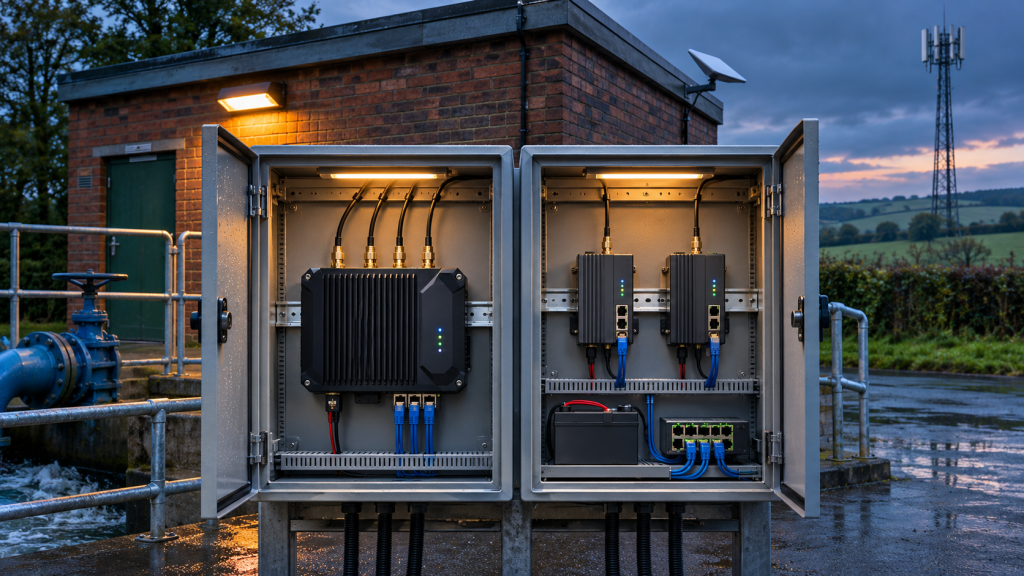
Picture a pumping station cabinet. There’s already a 4G router in it. Behind it sits an RTU sending readings and alarms to its own cloud platform. An engineer occasionally needs to get in to the PLC. The whole thing uses a few hundred megabytes a month, if that. The customer wants to know what happens if the network goes down, the router dies or the power fails.
Four bonded paths carrying that RTU’s traffic are lovely, but if the device reconnects quickly and sends what it stored during the gap, it gets very little practical benefit from them. Before quoting anything, I’d find out what’s really going on behind the router:
- Does the device open an outbound session to its own cloud (MQTT, HTTPS, a vendor platform)?
- Does a control room poll it on a private address?
- Is the router’s mobile IP on an allowlist somewhere?
- Does a contractor connect directly to a PLC or HMI?
- Does the device buffer readings and alarms when it can’t send them?
The question that decides almost everything: does the device call out, or does something call in? A device that calls home can reconnect from a new IP address and carry on. Something that’s polled, or reached from outside, needs a lot more thought and usually a managed breakout or VPN hub.
The two-router build, explained simply
Keep the existing router as the primary and add a second one on a different mobile network. Put both routers’ LAN ports, the RTU and anything else in the cabinet on one small industrial switch. Give each router its own management address, then use VRRP (Virtual Router Redundancy Protocol) so the pair presents one shared default gateway. The RTU points at that shared address and never needs to know which router is doing the work.
I’ll use the Teltonika RUT200 as the example because it’s cheap, common and does everything needed. It has one SIM slot, one WAN and one LAN Ethernet port, runs on 9 to 30 V DC and draws under 6.5 W, so it sits happily on a DC battery system. One SIM per router is exactly what you want here: two chassis, two SIMs, two networks.
| Device | Example address | Role |
|---|---|---|
| Router A | 10.42.17.2 | Primary (higher VRRP priority), mobile network group 1 |
| Router B | 10.42.17.3 | Standby, mobile network group 2, optional satellite on its WAN port |
| Shared VRRP gateway | 10.42.17.1 | Owned by whichever router is currently master |
| RTU / PLC | 10.42.17.20 | Static address, default gateway 10.42.17.1 |
How the handover actually works
On RUTOS, VRRP is an add-on package installed from the Package Manager. Both routers join the same virtual router ID with the same shared address. The one with the higher priority is master and answers for the gateway. The important bit is the optional connection check: the router pings a host you choose, and if the replies stop for long enough, it gives up the master role and the backup takes over. That’s what turns this from “survives being switched off” into “survives the mobile network dying”.
Here’s the subtlety that matters. Teltonika’s wiki says the check sends its pings from the VRRP interface, which is the LAN side, and they then follow the router’s own routing table out to the internet. That’s fine as long as the only way out of Router A is Router A’s own mobile connection. If someone has helpfully added a route on Router A that points at Router B, the check will sail out through Router B, get its replies, and Router A will hold onto the gateway while its own mobile path is dead. So: no routes between the two routers, and test it.
The build sheet
This is the bit I’d hand to an installer. It’s a morning’s work once you’ve done it once.
- Pick the SIMs first. Router A and Router B on different mobile network groups (more on that below). Check both actually work at the cabinet, with the antennas where they’ll live.
- Address the LAN. Router A and Router B get their own fixed LAN addresses. The RTU gets a static address with the shared VRRP address as its gateway. If anything uses DHCP, run it on one router only and make sure it hands out the shared address as the gateway, not the router’s own.
- Install VRRP on both. Same virtual ID, same shared address, Router A on a higher priority than Router B.
- Turn on the connection check on both. Point it at something reliable on the internet, ideally the platform the RTU reports to if it answers pings. The check takes a single IP address or hostname, so pick one that’s genuinely reliable. Ping interval, timeout and retry count are all adjustable. Don’t guess the handover time from the settings: measure it on the firmware you’re deploying, and don’t tighten it so far that one lost ping flips the gateway.
- Consider Virtualize MAC. RUTOS has an option to use a virtual MAC address for the shared gateway. Some PLCs and RTUs cling to an old ARP entry after a handover and keep sending to the wrong router for minutes. A virtual MAC sidesteps that. Test with the actual device.
- If Router B has satellite on its WAN port, set up failover on Router B with mobile preferred and satellite second, health checks on both, and “flush connections” on interface change so sessions don’t stay stuck on the dead path.
- Enrol both routers in RMS (or both in RCMS for a Robustel build) and set up comms-loss alerts so somebody is told when either router drops, not just when both do.
- Stagger firmware updates. Never update both routers on the same day. If an update breaks VRRP, you want the other one still behaving.
- Put the whole alarm path on the battery: both routers, the switch, the RTU and any satellite terminal.
- Witness the failure tests before anybody signs anything off (list at the end).
Check the model and firmware of whatever is already in the cabinet before buying anything. If the existing router can’t do VRRP with a connection check, replace it or use a separate dual-WAN gateway, and accept that a single gateway brings back a single box to fail.
Choosing two SIMs that are actually diverse
This is where most “resilient” designs quietly fall apart. Two SIMs from two providers can still end up on the same masts and the same core.
The obvious UK example: since the merger, VodafoneThree says Vodafone and Three customers are automatically using each other’s network. It completed core and radio network sharing across more than 10,000 sites in May 2026 and has since started rolling out a single new core, though that migration will take time. So I’d no longer count a Vodafone SIM and a Three SIM as two diverse paths. With three mobile network groups left in the UK (EE, Virgin Media O2 and VodafoneThree), treat each group as one network for initial resilience planning, put the two routers on two different groups, then verify the serving cells and core paths at the actual site.
Then come the multi-network SIMs. A roaming SIM can see several radio networks and still rely on one home core and one data breakout. A multi-IMSI SIM gives the service more than one subscriber identity to play with, but how those identities are provisioned, which networks they can use and what triggers a switch varies by product. CSL’s rSIM, for instance, carries two independent core network profiles on one SIM and says it switches on real data activity rather than signal strength. That’s a sensible idea, but it’s still one SIM in one router. I covered how breakout location shapes where your data actually goes in our piece on IoT SIM data sovereignty, and the same logic applies here: two SIMs that converge on one core will fail together.
| Question to ask the SIM provider | What it tells you |
|---|---|
| Which network group and serving cell does each router normally use at this site? | Whether you have two usable radio paths where the cabinet actually is. |
| Can both SIMs end up on the same network group, and can we steer their preferences? | Whether a recovery event could quietly put both routers on the same path. |
| Which core and data breakout does each identity use? | Whether a provider-side outage could take out both SIMs while both modems show full bars. |
| What triggers an identity change, and how long does it take? | Whether it reacts to a data failure or only to loss of registration, and how long the modem is out of action. |
| Are both SIMs on the same account, data pool or billing run? | Whether one admin mistake or unpaid invoice suspends both at once. |
If a provider can’t tell you where its routes converge, treat the diversity as unverified. For more depth on how these SIMs behave, multinetworksim.com and roamingsim.co.uk go into the detail.
Telemetry, engineering access and the fixed IP question
Bonded services sell a stable IP, and it’s a genuinely good feature. CSL keeps one address while the bearers underneath change. Comms365’s Continuum Constellation adds fixed IPs and VPN capability on top of Starlink. If a site needs a stable public address, that’s a sensible way to get one.
The question is what the address is doing. An outbound connection authenticated by a certificate or credentials usually doesn’t care that the RTU came back from a different IP. If the cloud platform checks a source-IP allowlist, you need a stable outbound address from a managed breakout. If an engineer needs the PLC, private VPN access handles that separately. Public inbound access is a different requirement again, with its own firewall rules and exposure.
For engineering access, Teltonika RMS VPN hubs and Robustel’s RobustVPN in RCMS both reach equipment behind the router without a public IP. Enrol both routers and prove an engineer can reach the PLC through either one. Watch the return path: a request arriving via Router B goes wrong if the PLC replies via Router A because A holds the gateway. Masquerading the VPN traffic towards the LAN, so the PLC sees it as coming from Router B’s own LAN address, keeps the session on the router it came in through. “The VPN’s up but I can’t reach the PLC” is a recurring thread on the Teltonika community forum, and the answer is usually routing or firewall zones rather than the VPN itself.
Continuous polling is the hard case. If a control room expects one private site subnet to stay reachable through two possible tunnels, something at the hub has to pick the working return route. VRRP sorts out the LAN gateway, not the far end. I haven’t seen either RMS or RobustVPN documented as automatically moving the same subnet between two router tunnels when VRRP changes hands, so get it demonstrated before you promise it. For a device that calls home, keep telemetry on the direct outbound path and use the VPN purely for engineering. That also means a management platform outage costs you remote access, not your alarms.
Down the rabbit hole: what if…
This is the bit the brochures don’t cover. I’ve tried to think of every way this build can let you down, and what you do about it.
| What if… | What happens | What fixes it |
|---|---|---|
| Router A is powered but its mobile data is dead | The classic zombie. The LAN still answers, the modem still looks registered, traffic goes nowhere. | The VRRP connection check. Make sure it can only go out through Router A’s own mobile path. |
| The probe target answers but the telemetry platform is unreachable | Router A passes its ping check and keeps the gateway while the RTU’s data goes nowhere. | A ping-based check can’t see this. Probe the telemetry platform itself if it answers, and rely on a heartbeat alarm in the control room for the rest. |
| Router A dies completely | VRRP adverts stop and Router B takes the gateway within seconds. | Nothing extra. This is the case two routers handle best. |
| Router A’s link keeps dropping in and out | The gateway bounces between routers and the RTU keeps reconnecting. | Sensible retry counts on the check. If it’s chronic, lower Router A’s priority until the cause is fixed. |
| Router A recovers but doesn’t take the gateway back | Router B carries on, which is fine, until Router B has a problem too. | A Teltonika community thread from July 2026 describes exactly this after a firmware update. Alert on which router is master and test failback after every update. |
| Both mobile networks are down | Both connection checks fail. What the pair does then depends on firmware, so you might end up with no master, or the wrong one. | Test it. Satellite or fixed line on Router B gives it a working path, so its check passes and it holds the gateway. |
| Both SIMs land on the same network | You’ve got two routers and one network. A network outage takes both. | Two different network groups, and SIM settings that stop them roaming onto each other’s. |
| Both multi-IMSI SIMs switch identity at once | Both modems are busy re-registering at the same moment. | Give the two SIMs different preferred networks, bench-test them together and record where each one lands. If both end up on the same fallback, treat it as a period of reduced diversity and make sure the routers still hand over cleanly. |
| A SIM is suspended or hits its data cap | The data stops, though the router may still look connected. | The connection check catches it. Keep the two SIMs on separate accounts or pools, with usage alerts. |
| The switch fails | Both routers are cut off from the RTU. It’s the single point of failure people forget. | An industrial DC switch on the battery, a spare in the van, or an RTU with two Ethernet ports. |
| The RTU holds onto a stale ARP entry | The handover happens but the RTU keeps sending to the old router for minutes. | Virtualize MAC, or test that the device honours gratuitous ARP. |
| Mains fails at the cabinet | Everything runs on the battery until it’s flat. | Size the battery for the measured load of the whole alarm path, including satellite and inverter losses. |
| Mains fails across the area | Your cabinet is fine. The masts may not be, depending on the operators’ backup power. | A non-cellular path (satellite) if the brief really demands it. |
| RMS or RCMS goes down | Engineers lose remote access. Telemetry carries on if it isn’t routed through the VPN. | Keep the telemetry path independent of the management platform. |
| The RMS licence lapses | Remote management and VPN access stop quietly. | Multi-year licences, or put renewal dates in somebody’s diary. |
| A firmware update breaks something | Both routers break together if you updated both. | Stagger updates and retest failover after each one. |
| Satellite is blocked by snow or a growing tree | The satellite path degrades just when you might need it. | Health checks on the satellite link, alerts, and a site survey that thinks about next summer’s leaves. |
| Router B dies during a mobile outage | Satellite goes with it if it’s only wired to Router B. | Accept it for ordinary sites. Critical sites need a satellite handoff either router can use. |
| Both antennas share one cable route or mast | One spade, one lightning strike, one vandal takes both. | Separate antennas, separate cable routes where practical, and surge protection. |
| The RTU’s own cloud platform is down | Your connectivity is fine but the control room sees silence. | Not a router problem, but a heartbeat alarm on silence tells you something’s wrong somewhere. |
None of this is exotic. It’s the stuff that turns up as a site visit at three in the morning. The difference between a resilient design and a box-ticking one is whether somebody thought about these rows before installing it.
Satellite and battery: the same rules for both quotes
Where one local outage could take out both mobile networks, satellite gives the site another way out. In the two-router design, the simple option is feeding the satellite terminal into Router B’s WAN port and letting Router B prefer its own cellular path. Because Router B’s connection check follows its own routing table, it passes whenever either of its paths is up, so it can hold the gateway over satellite when both mobile networks are down. Prove that sequence on the firmware you’re actually deploying.
Starlink has made this far cheaper than it used to be. ISPreview reported in October 2026 that Starlink’s Local Priority plan becomes “Business” on 1 December 2026, with a £20 a month UK terminal access charge plus data: a 500GB block at £84 or a 50GB top-up at £17. The report doesn’t say whether those business prices include VAT, hardware is on top, and Starlink changes its UK prices often, so get a current quote for your own site. Comms365 also launched sat365 in June 2026, a partner portfolio for reselling managed LEO services, if you’d rather someone else looked after the satellite side.
Power is where the comparison gets more honest than the brochures. A decent UPS can sit behind a bonding appliance just as easily as behind a pair of 4G routers, so give both proposals the same tested runtime and power stops being a differentiator. One shared UPS is a common point of failure in either design. And a battery in your cabinet does nothing for the mast it talks to. Ofcom published a technical report on mobile RAN power resilience in February 2025 and has since set out its expectations for operators’ backup power, but how long a particular mast stays up in a power cut is largely out of your hands.
Who sells resilience, and how they do it
Here’s how the market looks to me, grouped from the cheapest fix to the fully managed service. I’ve stuck to what each vendor says about its own product, so check the details on any quote.
| Vendor and product | Approach | Who runs it | Where it fits |
|---|---|---|---|
| SIM resilience | |||
| CSL Group, rSIM and DualCore | Two core network profiles on one SIM, switching on data activity. Dual-SIM router options. | CSL | Improving resilience without changing the hardware |
| Router failover and extra paths | |||
| Teltonika, RUT200 pair with RMS | Two routers, VRRP gateway failover, RMS for monitoring and VPN access | You or your installer | Outbound telemetry, retrofits, tight budgets |
| Teltonika, RUTM52 | One router with two 5G modems and two SIMs, both connections live at once | You or your installer | Fast network failover in one box, more bandwidth than a RUT200 |
| Robustel with RCMS and RobustVPN | Same two-router principle, with RobustVPN giving each gateway a fixed private VPN address | You or your installer | Robustel estates, machine builders |
| Starlink, Business | LEO satellite as a non-cellular path | You, or via a managed overlay | Third path where a regional mobile outage is in the brief |
| Self-managed bonding | |||
| Peplink, SpeedFusion | Bonding, Hot Failover that Peplink says keeps active sessions up, and WAN Smoothing that duplicates packets | You or a Peplink partner | Self-managed bonding with a big installer ecosystem |
| Viprinet | Router at site bonds every line into encrypted tunnels to a hub, usually in a data centre | You or a Viprinet partner | Mixed fixed and cellular bonding, broadcast and events |
| Digi International, WAN Bonding | Add-on to a Digi Remote Manager premium licence, using Bondix technology, on Digi routers | You, via Digi Remote Manager | Estates already standardised on Digi |
| Ericsson (Cradlepoint) | SD-WAN with flow duplication, flow balancing, bandwidth aggregation and forward error correction | You or an Ericsson partner | Enterprise estates on NetCloud |
| Speedify | Software bonding through Speedify’s servers or your own. Runs on OpenWrt 23.05+ and GL.iNet routers. | You | Low-cost bonding where supported hardware fits |
| Managed bonding and managed satellite | |||
| CSL Group, Outpost | Four cellular modems and SIMs bonded, plus satellite and fixed line. CSL says the site IP stays the same through failures. | CSL, fully managed with a 24/7 NOC | CCTV, construction, renewables, anything bandwidth-hungry or IP-sensitive |
| Comms365, SD-ONE | Bonds 4G, 5G and fixed lines into one aggregated link, for fixed and temporary sites | Comms365 and partners. Part of Wireless Logic since February 2026, still operating standalone. | Construction, warehouses, renewables, hosted voice |
| Comms365, Continuum Constellation and sat365 | Managed layer on Starlink: fixed IPs, QoS, VPN and SD-WAN, remote terminal management | Comms365 and resellers | Satellite-led sites that need business-grade addressing |
Resilience at five budget levels
Here’s how I’d frame the options for a customer. Every level assumes the alarm path is on a battery, because without that, none of the rest matters.
| Level | What you buy | Survives | Doesn’t survive |
|---|---|---|---|
| 1. Better SIM | Keep the router, swap to a multi-network or dual-profile SIM | Loss of one network, if the SIM switches on data failure | Router failure, a shared core or breakout failing, local power loss beyond the battery |
| 2. Second router | Add a second router on a different network group, VRRP, RMS on both | A dead network, a dead router, a zombie modem, a suspended SIM | Both mobile networks down, the switch failing, anything needing a fixed IP or live sessions |
| 3. Second router plus satellite | Level 2 with Starlink or similar on Router B’s WAN port | Everything in Level 2 plus a regional or national mobile outage | Router B failing during a mobile outage, unless satellite can reach either router |
| 4. Self-managed bonding | Peplink, Viprinet, Digi, Ericsson or Speedify, with your own or a partner’s hub | Path failures, and can preserve sessions through them depending on the service configuration and the capacity of the surviving links. Adds combined bandwidth and a stable IP at the hub | The bonding box itself failing, and you’re now running a hub as well |
| 5. Fully managed bonding | CSL Outpost, Comms365 SD-ONE or similar | Path failures, and can preserve sessions through them depending on the service configuration and the capacity of the surviving links, with the provider’s NOC monitoring the service | Appliance failure until the replacement arrives, and it’s the most expensive option |
Running costs scale the same way. Level 1 is a SIM. Level 2 is two SIMs and two lots of RMS credits. Level 3 adds a satellite subscription. Levels 4 and 5 add a bonding licence or service charge, and usually a hub or breakout. At Level 2 the extra router and an industrial switch come to a few hundred pounds at most, before the battery. A managed bonded service is typically a contract with installation, rental and support built in, so ask for a three-year total cost rather than a monthly price.
For me, the middle ground for most telemetry sites is Level 2, moving to Level 3 where a regional outage is genuinely part of the risk. It deals with the failures that actually happen, using hardware many sites already own, and the know-how fits on one page. Level 5 is the right answer when the site needs bandwidth, a fixed IP, unbroken sessions, or simply wants one throat to choke. What I’d avoid is paying Level 5 money for a site whose only job is sending a few kilobytes home.
Second router or bonded 4G: side by side
| Failure or requirement | Two routers, diverse SIMs, satellite option | Managed bonded 4G |
|---|---|---|
| One mobile path dies | Standby takes the gateway. The application reconnects, so prove what happens to alarms raised in the gap. | Traffic moves onto the surviving paths with the same site IP. Better suited to live sessions, depending on the application and remaining capacity. |
| The router itself dies | The second chassis takes over. A genuine advantage over one box carrying every modem. | Down until the appliance is replaced. Ask what response the contract actually commits to. |
| Both mobile networks fail | Satellite on Router B carries traffic, provided Router B is up. | Satellite or fixed line carries traffic if fitted. |
| Mains fails | Depends on tested runtime of the whole cabinet. | Same test, same answer. |
| More bandwidth | One link’s capacity at a time. | Combined capacity of every path. |
| Fixed public IP | Only with a separate managed breakout or VPN breakout. | CSL says the site IP stays stable. A routed public subnet is an option to confirm on the quote. |
| Who watches it | Whoever you give the job to. Make sure that’s somebody. | The provider’s NOC. |
Prove it with a fresh alarm
Agree what the site has to achieve before deciding how much resilience to buy. How long can the control room go without a fresh alarm? How long must the cabinet run without mains? Does an engineer need to connect during an outage? What happens to readings generated while the link is down? Then witness the tests, whichever option you buy:
- Dead uplink. Block everything leaving Router A’s mobile interface, both the RTU’s forwarded traffic and the router’s own connection-check pings, while the modem stays registered and the LAN stays up. This is the zombie fault, and Router B should take the gateway. Be careful: a rule that only blocks forwarded traffic leaves Router A’s own probe working, so the RTU goes silent while Router A still thinks it should hold the gateway. Pulling the antenna isn’t the same test either, because it only simulates loss of radio.
- Dead application path. Leave the probe target reachable but block only the route to the RTU’s telemetry platform. Router A will happily keep the gateway, because a ping-based check can’t see this. Note how long it takes anyone to notice, because this is the failure a heartbeat alarm in the control room exists to catch.
- Switch Router A off altogether.
- Bring Router A back and check it takes the gateway back cleanly.
- Take out both mobile paths, if you’ve paid for satellite.
- Run the cabinet on battery under the agreed load until you know the real runtime.
- Reach the PLC through each router in turn via RMS or RCMS.
- Restore power and links in a different order and see what recovers without a site visit.
At every stage, raise a fresh alarm and record when it reaches the control room, whether buffered alarms keep their original timestamps, and whether the control room can tell old data from a current reading. Write down the longest gap and anything that never arrived. That number is the real measure of resilience, not the number of SIMs in the box.
Some sites will come out of that test making the case for Outpost or SD-ONE, and fair play to the people who built them. Plenty of others will show that a second router, two properly diverse SIMs and a decent battery do the job using most of what’s already in the cabinet. Either way, the customer gets to see both designs and what each costs, and gets the answer to the only question that really matters: when the first connection failed, how long did it take the next real alarm to reach the control room? That’s a number you can put beside the price.
Quick answers
Is bonded 4G more resilient than two-router failover?
Not automatically. Bonded 4G moves traffic onto the surviving paths and keeps the site’s IP when a path drops, and adds bandwidth, though how well a live session survives depends on the application and the capacity left. Two separate routers survive the failure of a router, which a single bonding appliance can’t. For telemetry that calls home and buffers its data, a two-router build covers the failures that matter and can cost less, especially when it reuses the installed router.
Can two 4G routers share one gateway address?
Yes. VRRP lets two routers on the same LAN present one virtual gateway address. Devices point at that address, and whichever router is master carries the traffic. Teltonika’s RUTOS routers, including the RUT200, support VRRP with a ping-based connection check that hands over when the master’s internet connection fails.
Are Vodafone and Three SIMs diverse?
For resilience planning, treat them as one network group. Vodafone and Three customers now use each other’s sites through network sharing, and the company is moving to a single core. Put your two routers on two different groups, such as EE and Virgin Media O2, or one of those plus VodafoneThree, then check the serving cells at the site.
Do I need a fixed IP for 4G telemetry?
Only if something depends on it, such as a source-IP allowlist or inbound access from outside. Devices that authenticate with certificates or credentials and connect outbound usually just reconnect from the new address. Engineering access can run over a private VPN such as Teltonika RMS or Robustel RobustVPN.
What is the single point of failure in a two-router setup?
Usually the Ethernet switch both routers plug into, followed by the shared battery. Use an industrial DC switch on the UPS, keep a spare, and size the battery for the whole cabinet.
Does a second router replace managed bonding?
For outbound telemetry, often yes. For sites that need combined bandwidth, a stable public address, continuity for live sessions or a provider’s NOC running the service, no. The test is how long the next real alarm takes to arrive after the first connection fails.
Who provides managed bonded 4G in the UK?
CSL Group (Outpost) and Comms365 (SD-ONE, now part of Wireless Logic) both offer managed bonded services. Peplink, Viprinet, Digi, Ericsson Cradlepoint and Speedify supply bonding technology that partners or end users run themselves.
Sources: CSL Group, CSL Outpost; CSL Group, renewable energy case study; CSL Group, What is an IoT router; Comms365, Bonded Internet (SD-ONE); SecurityWorldMarket, Comms365 launches Continuum Constellation; MSP Channel, Comms365 launches sat365; Pulse 2.0, Wireless Logic acquires Comms365; Peplink, SpeedFusion; Viprinet, How Viprinet works; Digi International, WAN Bonding; Ericsson Cradlepoint, link aggregation in SD-WAN; Speedify, 5G bonding solutions; Teltonika Networks Wiki, RUT200 Failover and VRRP; Teltonika Networks Wiki, RMS VPN Hubs; Teltonika Community, VRRP failback after firmware update; Robustel, RCMS RobustVPN; VodafoneThree, network sharing upgrade completed; ISPreview, VodafoneThree new 5G core; TechRadar, Vodafone outage October 2025; Choose, Ofcom investigates BT and Three outages; ISPreview, Starlink UK pricing changes; Ofcom, Network and Service Resilience Guidance.
Follow-up: Teltonika has now launched its own bonding service, WANplex, managed in RMS with flat-rate credits and a hub you host yourself. It adds a new self-managed option to the budget levels above. I cover how it works, pricing and how to run the hub on a VPS in Teltonika WANplex: how it works and how to run your own hub.