Milesight UR35 with PoE Out: 4G Connectivity and Device Power From One Box
The PoE version of the Milesight UR35 powers IP cameras, access points and sensors directly from its LAN ports while backhauling over dual-SIM 4G. That removes the separate PoE switch, the injector and, at a lot of sites, the need for mains power at all. Here is where it earns its place, how the PoE side actually works, and the one power detail most buyers get wrong.
The problem it solves
Getting a camera or an access point working at a remote site usually means three separate jobs: a way to reach the internet, a way to power the edge device, and a way to tie them together. On a site with mains power and structured cabling that is a switch and a broadband line. On a rural verge, a car park, a construction compound, a solar-powered cabinet or a temporary event, none of that is there.
The common workaround is a stack of boxes: a cellular router for the connection, a PoE switch or a PoE injector to power the camera, and a power supply for each. More boxes means more cabling, more DIN-rail space, more failure points and a higher bill of materials. It also assumes you have mains power to run the switch, which at genuinely remote sites you often do not.
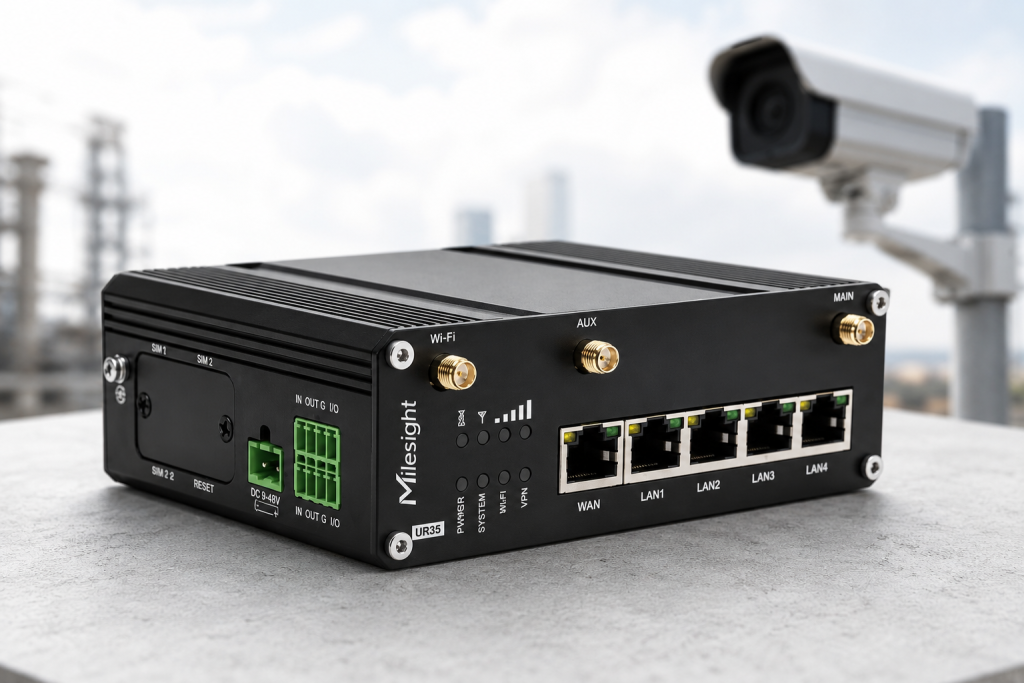
The PoE variant of the Milesight UR35 collapses that stack into a single hardened unit. It is a 4G LTE router and a Power-over-Ethernet source at the same time, so one DC-fed box brings the connectivity and powers the edge devices over the same Ethernet cables.
What the UR35 PoE-out variant actually is
The UR35 is Milesight’s Pro Series industrial cellular router. On the PoE variant, the four LAN ports become Power Sourcing Equipment (PSE): they inject DC power onto the same Cat5e or Cat6 cable that carries the data, so a compatible powered device (a camera, an access point, a LoRaWAN gateway or a sensor) needs only one cable for both power and network.
Core capabilities relevant to a PoE deployment:
- PoE PSE on four LAN ports to the 802.3af and 802.3at (PoE+) standards.
- Dual-SIM 4G LTE Cat 4 backhaul (up to 150 Mbps down / 50 Mbps up) with automatic failover between two carrier SIMs.
- Five 10/100 Mbps Ethernet ports (1 WAN + 4 LAN); the four LAN ports are the PoE-capable ones.
- 2.4 GHz Wi-Fi (802.11 b/g/n) as an access point or as a backup WAN client.
- Rugged build: metal IP30 enclosure, -40°C to +70°C operating range, DIN rail, wall or desk mount.
- Wide 9-48 V DC input with surge and reverse-polarity protection.
- Remote management through the Milesight Development Platform, plus VPN, firewall, serial (RS232/RS485), digital I/O and an embedded Python SDK.
How PoE out works on the UR35
Power over Ethernet lets a single Ethernet cable carry both data and DC power. The device supplying the power is the PSE; the device drawing it is the Powered Device (PD). On the UR35 PoE variant, the router is the PSE and your camera or access point is the PD.
Standards and per-port power
The UR35 supports two IEEE standards on its LAN ports:
- 802.3af (Type 1) – up to about 15.4 W at the port, roughly 12.95 W usable at the device after cable loss. Fine for most fixed cameras, sensors and VoIP-class devices.
- 802.3at / PoE+ (Type 2) – up to 30 W at the port, roughly 25.5 W usable at the device. Needed for PTZ cameras, heated enclosures and higher-power access points.
When you plug a PD in, the port runs a detection and classification handshake before it energises. That protects non-PoE gear from being sent power it cannot handle and lets the router allocate the right power class to each device.
The power budget rule that catches people out
This is the single most important thing to plan around. On the UR35 each PoE port can deliver up to 30 W, but the total across all four ports is capped at 60 W. You cannot run four 30 W devices at once, because that is 120 W and the router will only source 60 W in total. Plan the sum, not just the per-port figure.
It is still a full router while it powers your kit
Powering the device is only half the job. At the same time, the UR35 is routing that device’s traffic over dual-SIM 4G, applying its firewall, and carrying it inside a VPN tunnel if you have one configured. So a camera on a LAN port gets power and a secure backhaul in a single hop, from one managed box. The WAN port is separate and is not PoE; use it only if you also have a wired uplink to fail over to.
Power budget: worked examples
Use these indicative figures to plan a deployment. Always check each device’s rated PoE class and real draw, and keep the sum of all powered devices under the 60 W total budget.
| Powered device (typical) | Typical PoE draw | Rough count within 60 W total |
|---|---|---|
| Fixed IP camera (bullet or dome) | ~4-7 W | All 4 LAN ports comfortably |
| IR / varifocal camera | ~7-12 W | ~4 (watch the total) |
| PTZ camera (with heater/blower) | ~15-30 W | ~2 |
| Outdoor Wi-Fi access point | ~10-15 W | ~3-4 |
| PoE people counter / sensor | ~4-8 W | ~4 |
| Mixed: 1 PTZ + 1 AP + 2 fixed cameras | ~50 W | Fits inside the budget |
| 4 x 30 W PoE+ devices at once | 120 W | Will not fit – exceeds 60 W total |
Where the UR35 PoE out delivers real value
PoE out on a cellular router is not a gimmick; it changes what you can install and where. The value shows up wherever you need connectivity and device power but the site has neither structured cabling nor a mains PoE switch.
Remote and temporary CCTV
Construction compounds, car parks, rural yards, agricultural sites and perimeter security lines rarely have a convenient PoE switch. Mount the cameras, run short Ethernet drops back to the UR35, power them from its LAN ports and send the footage out over 4G. No trenching for a mains feed, no separate switch in the cabinet. The 60 W budget covers a set of fixed cameras or a couple of PTZ units, which suits most single-cabinet installs. For the full architecture of solar-powered, cellular-connected camera sites, see our guide to 4G connectivity for deployable CCTV towers.
Solar, off-grid and battery-powered sites
Because the UR35 is DC-native and PoE runs off its 48 V input, it fits neatly into solar and battery systems where everything already runs on DC. One box draws from the battery bank and both connects and powers a camera or an access point, with no mains inverter needed for the edge devices. This is the pattern for off-grid monitoring, energy-storage cabinets and remote infrastructure, and it is covered in depth in our guide to low-power cellular routers for solar and battery IoT.
EV charging and energy sites
Charge points and energy assets often want a nearby camera or a local access point alongside the connectivity for the asset itself. The UR35 provides the cellular link and powers that adjacent PoE device from the same unit, keeping the roadside or compound cabinet simple.
Rapid-deploy and event connectivity
Events, pop-up retail, welfare cabins and disaster-recovery setups need connectivity and powered edge devices up fast, then gone again. One UR35 brings the 4G link and powers the cameras or the site Wi-Fi access point, so a deployment is a single box plus a DC supply rather than a rack of kit.
Smart retail and people counting
Milesight’s own people-counting sensors and cameras are PoE devices, so a UR35 PoE can power the counters and backhaul their data over cellular in stores or pop-ups with no fixed line. That keeps the whole count-and-connect stack inside one vendor’s ecosystem and one managed device.
Utilities, water and agriculture
Pump stations, reservoirs, substations and field sites are exactly the remote, harsh, unmanned locations the UR35 is built for. Power a camera for visual verification and a Wi-Fi access point for local maintenance access, all from one -40°C-to-+70°C-rated box on the cabinet DIN rail. The connectivity design behind these sites is covered in our guide to remote SCADA access over cellular.
Site Wi-Fi from a single unit
Where you need local Wi-Fi at a remote site, power an outdoor PoE access point from the UR35 and let the router backhaul it over 4G. The router’s own 2.4 GHz radio can cover a small area, and a powered external AP extends that reach without a second power run. Where the router itself has to live outdoors, our outdoor cellular router guide covers weatherproof units and PoE-out at the pole.
The benefits, in short
- Fewer boxes, lower cost. No separate PoE switch or injector, and one power supply instead of several.
- Faster, simpler installs. Less cabling, less cabinet space, fewer things to go wrong on a remote visit.
- Works where there is no mains PoE. DC-native and off-grid friendly, so it suits solar, battery and vehicle power.
- One hardened enclosure. IP30 metal build, wide temperature range and DIN-rail mounting for cabinet and outdoor-enclosure installs.
- Resilient backhaul for the powered devices. Dual-SIM failover, ideally with multi-network SIMs, keeps the cameras and sensors online across carrier outages.
- Single point of management. Connectivity and the powered edge devices sit behind one router you manage remotely through the Milesight Development Platform.
Deployment checklist
Before you order and install
- Confirm you are ordering the PoE variant SKU, not a standard UR35.
- Add up the PoE draw of every edge device and keep the total under 60 W.
- Check whether any device needs 802.3at / PoE+ rather than plain 802.3af.
- Provide a 48 V DC supply (or a solar/battery output that delivers 48 V) sized for the PoE load plus the router.
- Use good-quality Cat5e or Cat6 and keep runs within PoE distance limits to allow for cable loss.
- Plan a SIM strategy: two carriers for failover, and a fixed-IP or private-APN SIM if the cameras need inbound access.
- Enrol the router in the Milesight Development Platform for remote monitoring and firmware updates before it leaves the bench.
Key specifications at a glance
| PoE (optional variant) | 4 x 802.3af/at PSE on LAN ports, 30 W per port, 60 W total |
|---|---|
| Power input | 9-48 V DC (48 V required for PoE), surge and reverse-polarity protected |
| Cellular | 4G LTE Cat 4 (150/50 Mbps), 3G fallback, dual SIM backup |
| Ethernet | 5 x 10/100 Mbps (1 WAN + 4 LAN) |
| Wi-Fi | 802.11 b/g/n 2.4 GHz, AP or client mode |
| Serial / I/O | 1 x RS232, 1 x RS485, 1 x DI, 1 x DO |
| GNSS | Optional (GPS/GLONASS/BeiDou/Galileo/QZSS) |
| VPN | IPsec, OpenVPN, GRE, L2TP, PPTP, DMVPN, WireGuard, ZeroTier |
| Enclosure | Metal, IP30, -40°C to +70°C, DIN rail / wall / desk |
| Management | Milesight Development Platform, SNMP, TR069, web, CLI, Python SDK |
Some third-party listings describe the UR35’s ports as Gigabit. Milesight’s own datasheet specifies 10/100 Mbps Fast Ethernet, which is ample for camera and sensor backhaul over 4G. Verify against the current datasheet if link speed is critical to your design.
Frequently asked questions
Does the Milesight UR35 have PoE out?
Yes, on the PoE variant. The four LAN ports act as Power Sourcing Equipment to the 802.3af and 802.3at (PoE+) standards, delivering up to 30 W per port and up to 60 W in total. PoE is an optional feature, so order the PoE SKU specifically.
How many cameras can a UR35 power over PoE?
It depends on each camera’s power draw, because the limit is the 60 W total budget rather than a fixed device count. As a guide you can power around four fixed IP cameras, or roughly two PTZ cameras, or a mix such as one PTZ plus an access point plus two fixed cameras. Add up the draw and stay under 60 W.
What PoE standard does the UR35 support?
Both 802.3af (up to about 15.4 W at the port) and 802.3at / PoE+ (up to 30 W at the port). PoE+ is what you need for PTZ cameras, heated enclosures and higher-power access points.
Do I need a special power supply for PoE on the UR35?
Yes. The router accepts 9-48 V DC, but PoE mode needs the full 48 V. If you power it at 12 V or 24 V the ports will not deliver PoE properly, so size the supply, solar controller or battery output for 48 V and for the total PoE load plus the router’s own consumption.
Can the UR35 power a camera and give it 4G internet at the same time?
Yes. The powered device gets both its power and its network from the same LAN port in a single hop. The router powers it over PoE and simultaneously routes its traffic over dual-SIM 4G, through the firewall and any VPN you have configured.
Can the UR35 PoE run off solar or a battery?
Yes. It is DC-native with a 9-48 V input, which suits solar and battery systems well. For PoE you need the input at 48 V, so design the solar or battery output to deliver 48 V and to cover the PoE load plus the router.
Specifications are drawn from the Milesight UR35 datasheet and quick start guide. PoE is an optional variant feature. Device power figures are indicative and vary by model and conditions; always confirm each powered device’s rated PoE class and draw, and verify current specifications against the Milesight datasheet before finalising a design.