
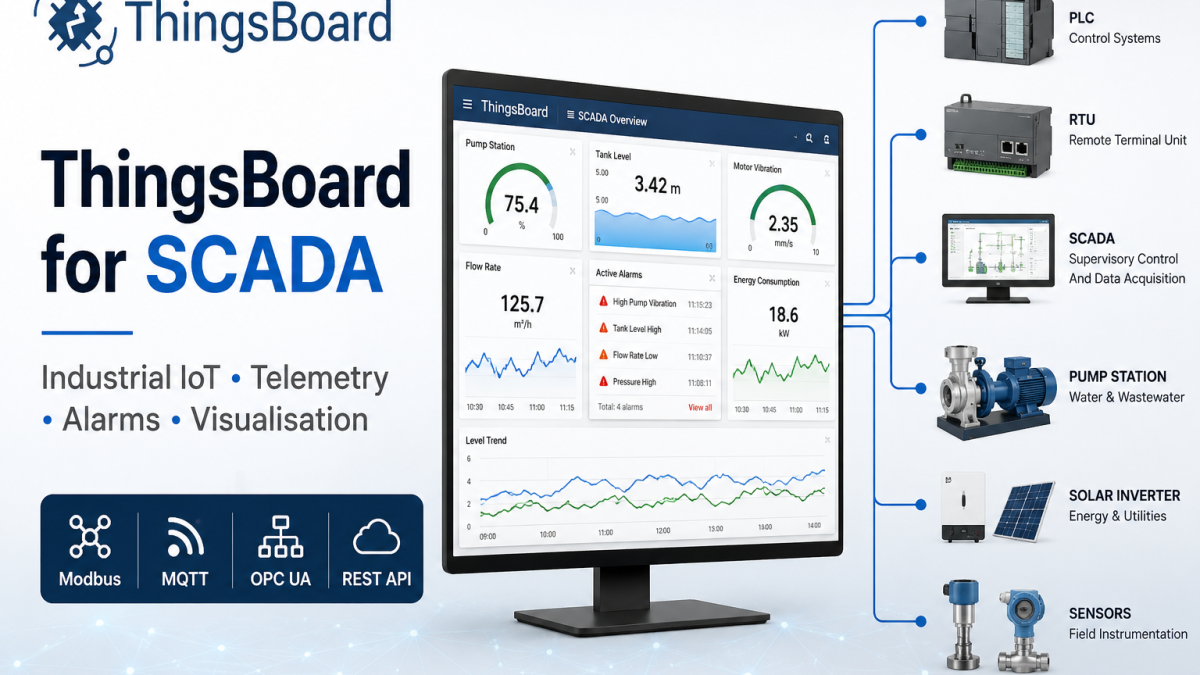
ThingsBoard for SCADA: Modern Monitoring Without the Legacy Overhead
Traditional SCADA systems are expensive, proprietary, and built for a world before cellular connectivity and cloud infrastructure. ThingsBoard offers a different path – open source, protocol-native, and deployable anywhere from cloud to air-gapped on-premise.
SCADA has always been about one thing: visibility over distributed infrastructure. Whether that’s a water treatment network, a gas pipeline, an energy substation, or a manufacturing line, the core requirement is the same – reliable data collection, meaningful visualisation, and fast alerting when something goes wrong.
The problem with traditional SCADA platforms is the cost and rigidity. Proprietary HMI software. Vendor-locked hardware. Licensing models that charge per tag. Integration that requires specialist contractors and weeks of configuration work. For operators running modern IoT-enabled equipment over cellular or Ethernet WAN, that model feels increasingly mismatched.
ThingsBoard has become one of the most widely adopted open-source IoT platforms in industrial and utility deployments precisely because it addresses these friction points head-on. It speaks the protocols SCADA engineers already use, runs wherever you need it to run, and scales from a 10-device pilot to a multi-site enterprise deployment on the same codebase.
What ThingsBoard brings to SCADA deployments
ThingsBoard is not a traditional SCADA platform – and that distinction matters. It does not try to replace a full DCS or PLC programming environment. What it does is provide the data layer, visualisation layer, and alerting layer that sit above your field devices and controllers, connecting them into a coherent operational picture.
Protocol-Native Connectivity
Modbus TCP/RTU, OPC-UA, MQTT, HTTP, CoAP, and SNMP supported natively via the IoT Gateway component – no middleware required.
No-Code Dashboards
Drag-and-drop SCADA-style widgets including gauges, charts, alarm tables, maps, and process flow diagrams. No HTML or JavaScript needed.
Alarm Engine
Threshold, rate-of-change, and composite alarms with configurable severity levels, escalation rules, and email/SMS/webhook delivery.
Digital Twin Hierarchy
Model your asset structure – Sites, Buildings, Zones, Devices – and apply rules and dashboards at any level of the hierarchy.
Role-Based Access
Granular RBAC lets you give operators, engineers, and management different views and permissions on the same platform instance.
Deployment Flexibility
Public Cloud, Private Cloud, self-hosted on-premise, or ThingsBoard Edge for local processing and offline resilience.
Protocol support – the practical reality
The most common integration question in any SCADA context is protocol support. Field devices – PLCs, RTUs, meters, sensors – rarely speak MQTT natively. Most still communicate over Modbus or OPC-UA, sometimes over serial RS-485 backplanes.
ThingsBoard handles this through its IoT Gateway component, which runs as a lightweight service on any Linux-capable device (including industrial routers and edge computers) and translates legacy protocols into ThingsBoard’s telemetry API.
| Protocol | Connector Type | Typical Use |
|---|---|---|
| Modbus TCP | IoT Gateway | PLCs, energy meters, flow meters over Ethernet WAN |
| Modbus RTU | IoT Gateway (serial) | RS-485 sensor buses, legacy RTUs |
| OPC-UA | IoT Gateway | Industrial automation servers, DCS integration |
| MQTT | Native / TBMQ broker | Modern IoT sensors, cellular gateway telemetry |
| HTTP/REST | Native | Web-connected devices, REST-based data sources |
| SNMP | IoT Gateway | Network device monitoring, UPS status |
| BACnet | IoT Gateway | Building management systems, HVAC |
| DNP3 | Third-party / custom | Utility SCADA, substation automation |
Note on DNP3: ThingsBoard does not include a native DNP3 connector in its standard IoT Gateway. For utility deployments requiring DNP3 (TCP port 20000), integration is typically handled via a DNP3-to-MQTT bridge at the edge, or through a custom connector. This is worth scoping early if your field devices are DNP3-only.
How a typical SCADA deployment looks on ThingsBoard
The architecture for a cellular-connected SCADA deployment using ThingsBoard generally follows this pattern:
The industrial router does two jobs here. First, it provides the WAN link – typically 4G LTE or 5G cellular with failover to a secondary SIM or fixed-line backup. Second, it can run the ThingsBoard IoT Gateway as a Docker container or lightweight application, handling local protocol translation before data is sent upstream. This means Modbus polling happens locally and only processed telemetry is transmitted over the cellular link – reducing data usage and latency.
For fixed IP connectivity – which is important for SCADA deployments where the server needs to reach out to field devices as well as receive telemetry – a fixed IP SIM at the remote site removes the need for complex VPN configuration in many topologies. Combined with ThingsBoard’s built-in RPC commands, operators can push configuration changes and commands back to field devices through the same path.
ThingsBoard Edge – the case for local processing
One of the most practically important features for SCADA engineers is ThingsBoard Edge. This is a version of the ThingsBoard platform that runs locally at the remote site – on an industrial PC, edge server, or capable router – and operates independently of cloud connectivity.
The value is straightforward. In SCADA applications, a WAN outage should not mean loss of control visibility. ThingsBoard Edge continues to collect data, evaluate alarms, and present dashboards locally during any connectivity interruption. When the link recovers, it synchronises telemetry history back to the cloud instance. No data gaps, no blind spots during outages.
This architecture is particularly relevant for sites in marginal cellular coverage areas, offshore or remote locations, or any deployment where regulatory requirements mandate local data retention – energy, water, critical national infrastructure.
SCADA verticals where ThingsBoard is actively deployed
Energy & Utilities
Substation monitoring, distributed energy resource management, grid-edge metering, renewable generation telemetry. ThingsBoard’s energy management SCADA use case is one of its most documented verticals.
Water & Wastewater
Pump station monitoring, tank level control, flow and pressure telemetry across distributed treatment and distribution networks. MQTT from modern RTUs; Modbus from legacy equipment.
Oil & Gas
Pipeline pressure and flow monitoring, wellhead telemetry, compressor station oversight. ThingsBoard has a published oil and gas drilling SCADA use case with an interactive demo dashboard.
Manufacturing
OEE monitoring, machine status dashboards, production line KPI tracking. OPC-UA integration connects ThingsBoard directly to existing automation server infrastructure.
Agriculture & Irrigation
Remote pump and valve control, soil moisture and weather station telemetry, irrigation scheduling. Particularly well-suited to solar-powered remote sites with intermittent connectivity.
Battery Energy Storage (BESS)
State of charge monitoring, thermal management alerts, grid dispatch telemetry. Growing deployment area as utility-scale storage sites multiply under grid decarbonisation programmes.
Community Edition vs Professional Edition – what matters for SCADA
ThingsBoard Community Edition is open source and free to self-host. For many SCADA deployments, particularly pilots and smaller networks, it covers the core requirements: Modbus/OPC-UA via IoT Gateway, dashboard builder, alarm engine, rule chain processing, and basic user management.
Professional Edition adds features that become relevant at scale or in multi-tenant and enterprise contexts: advanced RBAC with domain isolation, white labelling, scheduler, report generation, and enhanced rule chain capabilities. The key decision point is usually whether you need multiple customer environments on a single instance, or whether you need the scheduler for automated reports and periodic commands.
For cloud-hosted deployments without the overhead of self-managing the infrastructure, ThingsBoard Public Cloud offers both a free tier and paid plans starting at the Pilot level – useful for proof-of-concept work before committing to an on-premise rollout.
Getting started – a realistic path
The most practical route into a ThingsBoard SCADA deployment is to run a cloud trial on a representative subset of your field devices first. ThingsBoard’s Public Cloud free tier imposes no hard device limit on the Community Edition and is accessible without a credit card. Connect two or three devices via the IoT Gateway, build a basic dashboard, and test your alarm logic before touching production infrastructure.
From there, the same configuration – device profiles, rule chains, dashboard layouts – migrates directly to a self-hosted Professional Edition or Private Cloud instance. ThingsBoard calls this pilot-to-production portability a core design principle, and in practice it does hold up: there is no architectural rework required when moving from cloud trial to on-premise deployment.
For teams already using industrial cellular routers at remote sites, the IoT Gateway can be deployed as a Docker container on routers that support containerisation, or on a co-located edge device. Either way, the Modbus or OPC-UA polling configuration is done through a simple JSON file – no programming required.
Frequently asked questions
Can ThingsBoard replace a traditional SCADA/HMI system entirely?
For monitoring, visualisation, and alerting – yes, in most deployments. ThingsBoard is not a PLC programming environment and does not replace ladder logic or IEC 61131 tooling. But as the supervisory and data layer above field devices, it is a complete replacement for traditional SCADA HMI software in the majority of IoT-connected use cases.
Is ThingsBoard suitable for air-gapped or offline networks?
Yes. The self-hosted Professional Edition and Community Edition can run entirely on-premise without internet connectivity. ThingsBoard Edge extends this to local site deployments. Licensing for PE requires an initial online activation, but ongoing operation does not require internet access.
How does ThingsBoard handle high-frequency telemetry from many devices?
ThingsBoard Professional Edition scales horizontally and supports Cassandra as a time-series database backend for high-volume deployments. For very high message rates, TBMQ (ThingsBoard’s dedicated MQTT broker) can be deployed in front of the main platform to handle ingestion at scale before routing telemetry to the processing layer.
What is the difference between ThingsBoard IoT Gateway and ThingsBoard Edge?
The IoT Gateway is a lightweight protocol translator – it reads Modbus, OPC-UA, BACnet etc. and converts data into ThingsBoard telemetry format before sending upstream. ThingsBoard Edge is a full local instance of the ThingsBoard platform with its own database, rule engine, and dashboard server. Edge is for sites needing local autonomy and offline operation; Gateway is for protocol translation without local processing.
Is professional support available for ThingsBoard?
Yes. ThingsBoard Inc. offers paid support packages and SLAs for professional and enterprise deployments. Training courses are also available. Community support is available via the ThingsBoard GitHub and forum for Community Edition users.
Try ThingsBoard on your next SCADA project
Start with the Public Cloud free tier – no credit card required. Connect your first devices, build a dashboard, and test your alarm logic before committing to infrastructure.
Get Started with ThingsBoard Community Edition is open source and free to self-host. Cloud plans start at $149/month.