VPS for SCADA, CCTV and industrial remote access: a practical guide for 2026
Why port forwarding stopped working – and what replaced it
If you have recently searched “port forwarding not working on EE” or “can’t access my router remotely on 4G” you are not alone and you are almost certainly not doing anything wrong. The most common cause is carrier-grade NAT (CGNAT) – a technology mobile operators use to share a single public IP address across many customers simultaneously. Behind CGNAT, inbound connections simply cannot reach your router. Port forwarding rules on the router make no difference because the block is at the operator’s infrastructure level, not on the device.
This affects most 4G and 5G SIM cards sold by consumer and business operators in the UK today. EE, Vodafone, Three, and O2 all use CGNAT extensively. The fixed public IP SIMs that bypass this exist but cost a premium, and as we will come to, they create their own security problems.
The solution used by experienced industrial network engineers is straightforward: rather than trying to receive inbound connections at the router, connect the router outbound to a fixed point in the cloud. That fixed point is a VPS – and it changes the economics and security of remote access completely.
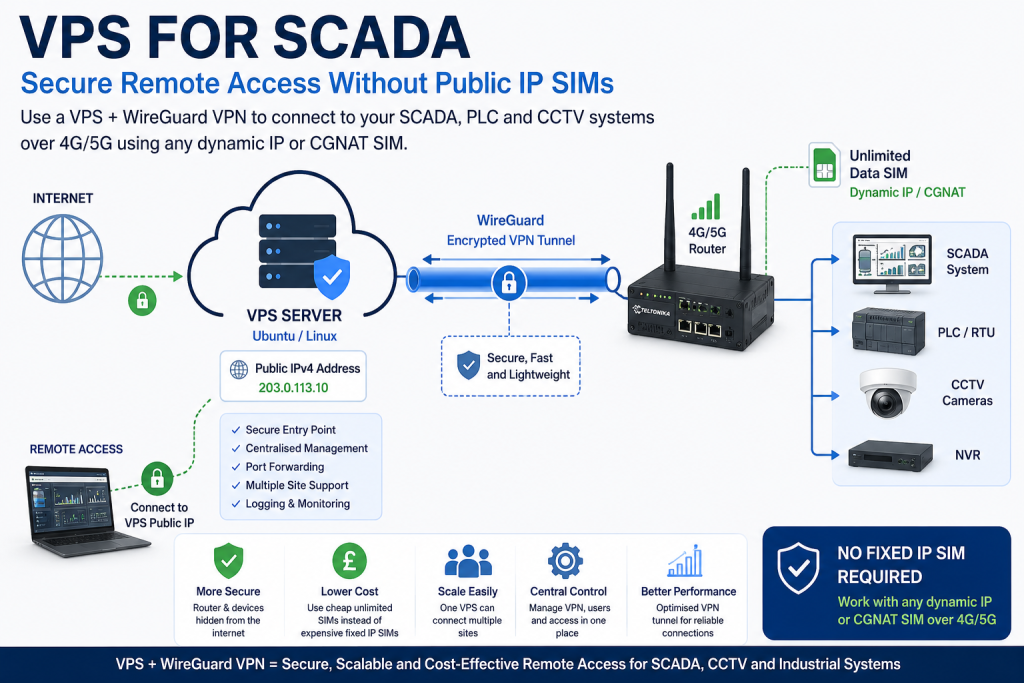
The fundamental shift: instead of the engineer connecting inbound to the router, the router connects outbound to a VPS hub. The SIM type becomes far less important because the tunnel is established outbound. Whether the SIM uses CGNAT, a dynamic public IP, a private APN, or a roaming network profile, the VPS remains the fixed point of connectivity.
See also: Private vs public IP for cellular IoT – a deeper look at IP addressing options for IoT deployments.
The old way vs the new way
Understanding why the VPS approach is better requires seeing both architectures side by side. Here is how the same remote access requirement looks under each model.
Left: the traditional approach. The router holds a public IP and is internet-facing. Shodan finds it within hours. Right: the VPS hub approach. The router connects outbound on any SIM type. The engineer reaches everything through the VPN. The router is invisible to the internet.
What happens when you put a public IP SIM on an industrial router
A public IP SIM does not mean someone is targeting your site specifically. It means your router is visible to automated scanners that continuously probe every reachable IPv4 address on the internet.
This is not a theoretical concern. Tools like Shodan and Censys maintain live indices of every internet-facing device. The moment a router with a public IP connects, scanning activity begins. In practice, most public IP addresses receive their first probe within minutes. Industrial routers running Teltonika RutOS, Milesight firmware, or similar are identifiable from their HTTP response headers and banner strings – which means scanners can fingerprint the device and target known vulnerabilities specifically.
The consequences go beyond targeted attacks. Consider what automated scanners do when they find an industrial router:
- Port 22 (SSH) – brute-forced continuously using credential dictionaries and leaked password lists. Mirai and its descendants have been doing this since 2016.
- Port 80/443 (router web interface) – probed for default credentials, known CVEs, and authentication bypasses.
- Port 502 (Modbus TCP) – queried directly. Modbus has no authentication. Any host that reaches port 502 can read process values from a PLC and in many cases write to output registers. No login required.
- Port 47808 UDP (BACnet) – similarly unauthenticated. Building automation systems across thousands of sites have been indexed by Shodan with their BACnet device objects fully readable.
- Port 554 (RTSP) – camera feeds probed with default credentials. Credential-stuffing attacks on CCTV NVRs are automated and ongoing.
The data cost nobody talks about: a public IP SIM on a busy router receives scan traffic, probe packets, and bot requests continuously – even at 3am with no legitimate engineer connected. Each packet costs data. Individually tiny, across a fleet of 50 sites over a year, the bill is real. Private SIMs and the VPS approach eliminate this entirely.
The VPS architecture removes the router from the internet-facing attack surface entirely. The router’s SIM makes outbound connections only. There is no inbound path from the internet to the router. Shodan cannot index it. Mirai cannot scan it. The attack surface moves to the VPS, where a proper Linux security stack – Fail2Ban, UFW, geo-blocking, audit logging, automatic updates – provides defence in depth that no router firewall can match.
The VPS hub architecture: how it works
The core architecture is consistent regardless of application. Each remote site has an industrial router connecting outbound via WireGuard (or OpenVPN) to a VPS in the cloud. The VPS holds the fixed public IPv4 address. Engineers connect to the VPS using the same VPN client. From there, every connected site appears on the same virtual network – LAN devices at each site are addressable directly by their local IP.
One VPS serves an entire fleet. Single public IP, single firewall, single audit point. Engineer reaches any LAN device at any site directly through the VPN. All routers connect outbound – CGNAT and private IP SIMs work perfectly.
The power of this architecture at scale becomes clear when you think about fifty sites. With public IP SIMs you have fifty separate internet-facing attack surfaces, fifty sets of port forwarding rules to maintain, fifty separate data bills inflated by scan traffic, and no centralised audit trail. With the VPS hub, you have one firewall to manage, one set of access rules, one audit log, and routers that are invisible to the internet.
VPS vs fixed public IP SIM: a direct comparison
Many engineers and system integrators still default to fixed public IP SIMs for remote access because it is the approach they know. It is worth examining the two directly side by side.
| Factor | Fixed public IP SIM | VPS hub + any SIM |
|---|---|---|
| Remote access possible? | Yes – via port forwarding | Yes – via VPN tunnel |
| Works behind CGNAT? | No – CGNAT blocks inbound | Yes – outbound tunnel only |
| Router internet-facing? | Yes – fully exposed | No – invisible to internet |
| Shodan-visible? | Yes – indexed within hours | No |
| Background scan data waste? | Yes – continuous | No |
| Modbus / BACnet exposure risk? | High if misconfigured | None – behind VPN |
| Security controls available | Router firewall only | Full Linux stack on VPS |
| Fleet management at 50 sites | 50 separate port fwd sets | One VPN config on VPS |
| Audit logging | Per-router, inconsistent | Centralised on VPS |
| SIM cost (indicative UK) | £10-25/month per SIM | £3-8/month per SIM (any type) |
| VPS cost | None | £3-12/month total for fleet |
| Total cost at 20 sites | ~£300-500/month | ~£70-170/month |
For new deployments in 2026, the VPS approach wins on security, cost, and manageability at virtually every scale. Fixed public IP SIMs remain valid for specific cases – legacy monitoring platforms that initiate inbound connections to a known IP, or temporary deployments where VPN infrastructure is not justified. For everything else, the VPS model is the better choice. See our guide to private vs public IP for cellular IoT for a deeper look at SIM addressing options.
Configuring WireGuard on Teltonika routers
Teltonika industrial routers are the most widely deployed cellular routers in the UK industrial IoT market. All current Teltonika models running RutOS support WireGuard natively – configuration is built into the web interface under Services > VPN > WireGuard. No additional packages or firmware modifications are needed.
The configuration process on the router side is straightforward. You create a new WireGuard interface, paste in the VPS server’s public key and endpoint address (the VPS public IP and WireGuard port, typically 51820), define the allowed IPs (the VPN subnet and any site subnets you want the tunnel to carry), and enable the interface. Persistent keepalive of 25 seconds is recommended for cellular connections – this keeps the tunnel active through periods of low traffic and speeds up reconnection after a cell reselection event.
The router models most commonly used for SCADA and industrial remote access deployments, and their primary use cases:
Teltonika RMS alongside WireGuard: Teltonika RMS (Remote Management System) works independently of WireGuard and operates over its own outbound connection on port 15009. Many deployments run both: WireGuard for low-latency direct LAN access during engineering work, and RMS for fleet monitoring, configuration management, and remote CLI access between visits. The two complement each other well. RMS does not require a public IP SIM or a VPS – it uses Teltonika’s own cloud infrastructure.
Configuring WireGuard on Milesight routers
Milesight industrial routers are an increasingly popular alternative to Teltonika, particularly for deployments requiring low-power operation, extended temperature ratings, or cellular Category 1 (Cat 1) modems for SCADA telemetry where the lower data rate of Cat 1 is sufficient and the reduced power draw and cost is attractive. The SCADA remote access guide covers Milesight in detail alongside Teltonika.
All current Milesight UR-series routers support WireGuard. Configuration is under VPN > WireGuard in the web interface. The process mirrors Teltonika: create a WireGuard interface, add the VPS as a peer using its public key and endpoint, configure allowed IPs and persistent keepalive. Milesight routers also support OpenVPN client/server and IPSec simultaneously with WireGuard – useful where different tunnel types are needed for different parts of the network.
The cost comparison
The economics of the VPS approach become compelling when you run the numbers across a real fleet.
| Traditional approach | Typical monthly cost |
|---|---|
| Fixed public IP SIM (per site) | £10-25/month per SIM |
| Private APN setup | £50-200 setup + ongoing operator charges |
| MPLS / leased line per site | £100-500+ per site per month |
| VPS approach | Typical monthly cost |
|---|---|
| VPS instance (1-10 sites) | £3-6/month total |
| VPS instance (10-50 sites) | £6-12/month total |
| VPS instance (50-250 sites) | £12-30/month total |
| Private or CGNAT IoT SIM | £2-8/month per site |
| WireGuard software | Free – open source |
For a 20-site SCADA deployment: fixed public IP SIMs at £15/month each costs £300/month. Private IoT SIMs at £5/month plus a single VPS at £8/month costs £108/month. That is £2,300 per year saved, or over £23,000 across a ten-year site lifetime – before accounting for the reduced data bills from eliminating background scan traffic.
VPS sizing and cost calculator
SCADA and industrial remote access VPS calculator
Estimate the right VPS specification and cost for your deployment
Security: what the VPS gives you that a router cannot
- Fail2Ban – automatically blocks IP addresses after repeated failed authentication attempts. Stops brute force attacks on SSH and VPN credentials without manual intervention.
- UFW firewall – precise port-level control. Only the WireGuard UDP port needs to be open on the VPS. Everything else is dropped.
- Geo-blocking – if your sites are in the UK and your engineers are in the UK, you can drop all traffic from outside the UK at the firewall. Eliminates the majority of automated attack traffic at source.
- Centralised audit logging – every tunnel establishment and connection attempt logged in one place. Essential for NIS2 compliance and regulated industries.
- Public key authentication – WireGuard uses public key cryptography. No passwords to brute-force. Each router and each engineer has a unique keypair. Revoking one does not affect others.
- Network segmentation – routing rules on the VPS can restrict each engineer to only the sites they are authorised for. Sites cannot communicate with each other. Zero-trust principles at low cost.
- Automatic security updates – unattended-upgrades on Ubuntu applies OS security patches automatically. Router firmware updates are manual; VPS security patching can be fully automated.
Industrial protocol note: Modbus TCP, BACnet/IP, DNP3, and IEC 60870-5-104 have no built-in authentication. The VPS/VPN architecture ensures only authenticated VPN connections can reach these protocols. This is the correct security posture for industrial control systems in 2026. The alternative – port forwarding these protocols via a public IP SIM – should be considered unacceptable for any deployment where the consequences of unauthorised access are significant. See also the IoT connectivity reference for wider context on IoT security architecture.
Which protocols work over a VPN tunnel?
| Protocol | Port | Application | Notes |
|---|---|---|---|
| Modbus TCP | 502 | PLCs, RTUs, energy meters | No auth – VPN is essential |
| BACnet/IP | 47808 UDP | Building automation, HVAC | UDP broadcast needs careful routing |
| DNP3 | 20000 | Water, utilities, substations | TCP – works cleanly over VPN |
| IEC 60870-5-104 | 2404 | Power systems, substations | TCP – works cleanly over VPN |
| OPC-UA | 4840 | Modern SCADA, MES | Has own security layer |
| MQTT | 1883/8883 | IoT sensors, telemetry | Usually outbound to broker – VPN optional |
| RTSP | 554 | CCTV / IP cameras | Higher bandwidth – size VPS accordingly |
| EtherNet/IP | 44818 | Allen-Bradley PLCs | Check MTU settings over VPN |
| OCPP | Various | EV charge point management | WebSocket – works over VPN |
| RDP / VNC | 3389 / 5900 | Remote desktop to HMIs | Higher bandwidth; limit access by user |
Setting up the VPS: what is actually involved
A WireGuard VPS hub for industrial remote access can be operational in under two hours for someone comfortable at a Linux command line. The steps are consistent regardless of provider:
- Provision the VPS – choose a provider with a UK data centre. Ubuntu 22.04 LTS or 24.04 LTS. 1-2 vCPU and 1-2 GB RAM covers most SCADA fleets up to 50 sites.
- Install WireGuard – included in the Ubuntu kernel since 20.04.
apt install wireguardinstalls the tools. wg-easy provides a web interface if preferred over command-line configuration. - Configure the server interface – generate server keypair, create
wg0.conf, set ListenPort (51820), enable IP forwarding in/etc/sysctl.conf. - Harden the server – UFW: allow 51820/udp, allow 22/tcp from your IP only, deny everything else. Install Fail2Ban. Enable unattended-upgrades. Disable password SSH authentication.
- Add router peers – each site router gets a WireGuard peer block in the server config: router public key, allowed IPs covering the site’s LAN subnet. On Teltonika: Services > VPN > WireGuard. On Milesight: VPN > WireGuard.
- Add engineer peers – each engineer gets a WireGuard config for laptop or phone. When connected they route to any site LAN the server allows for their keypair.
- Test and document – verify each site’s LAN is reachable, confirm device access, document the IP addressing scheme and peer keypair registry.
Lumadock: a purpose-built VPS for this use case
Lumadock provides managed VPS instances with UK data centres, clean Ubuntu environments, fixed IPv4 addressing, and cPanel access – making the setup process above accessible to engineers who are more comfortable configuring routers than administering Linux servers. Pricing starts at a few pounds per month, well under the cost of a single fixed public IP SIM.
For IoT and SCADA deployments, Lumadock’s London infrastructure gives low-latency access to UK field sites. Other VPS providers are available – AWS Lightsail, Linode, DigitalOcean, Hetzner, and OVH all offer comparable Ubuntu instances at similar price points.
Explore Lumadock for industrial remote accessApplications beyond SCADA
The VPS hub architecture is identical regardless of the vertical. The sections below summarise the key considerations for each application area. Dedicated guides for each are in development at IoTVPS.co.uk.
Water treatment and utilities
Boreholes, reservoirs, pumping stations and treatment works across wide geographic areas. High NIS2 compliance requirements. VPS provides the audit trail and access control that regulators require. See also the SCADA cellular connectivity guide.
Solar and renewable energy
Inverter monitoring, revenue metering, and remote diagnostics across sites often in areas with no fixed broadband. Cellular plus VPS hub is frequently the only practical architecture. Low-power routers on solar/battery benefit from WireGuard’s minimal CPU overhead.
CCTV and NVR remote access
The traditional approach for CCTV was port forwarding to an NVR on a public IP SIM. The VPS approach keeps NVRs completely off the internet. Engineers connect via VPN and access the NVR at its LAN IP directly. See 4G connectivity for deployable CCTV towers for a detailed treatment.
Building management systems
HVAC, lighting, access control, and energy monitoring. Many BMS installations predate modern cybersecurity requirements. VPN access removes internet exposure entirely for BACnet and Modbus-based systems that were never designed to be internet-facing.
EV charging infrastructure
Charge point management, OCPP gateway access, firmware updates, and fault diagnosis across distributed EV charging networks. OCPP over cellular with a VPS hub is increasingly the standard deployment architecture.
Traffic and highway systems
ANPR cameras, variable message signs, traffic signals, and roadside monitoring units – often on cellular with no fixed broadband. VPS hub provides reliable central access for highways engineers and consistent audit logging for highway authority compliance.
Frequently asked questions
Why does port forwarding not work on my 4G router?
The most common reason is carrier-grade NAT (CGNAT). Your mobile operator assigns many customers to the same public IP address and uses NAT to separate their traffic. Inbound connections cannot be forwarded through CGNAT to a specific customer’s router – the block is at the operator level, not on your device. The solution is not to fight CGNAT but to route outbound from the router to a VPS hub, which bypasses the problem entirely. A fixed public IP SIM is the other option but costs more and exposes the router to the internet.
Do I need a fixed public IP SIM for SCADA remote access?
No. With a VPS hub, the SIM type at the remote end is far less important. The router connects outbound to the VPS regardless of whether the SIM uses CGNAT, a dynamic public IP, a private APN, or a roaming profile. The VPS holds the fixed public IP. For most deployments in 2026, a private or CGNAT IoT SIM plus a VPS is cheaper and more secure than a fixed public IP SIM.
Is WireGuard or OpenVPN better for industrial deployments?
WireGuard is the better choice for most new deployments. It runs in the Linux kernel, uses significantly less CPU per tunnel than OpenVPN, performs better on high-latency cellular connections, and is supported natively on all current Teltonika and Milesight routers. OpenVPN is the fallback for older routers that do not support WireGuard, or where your security policy requires a specific PKI infrastructure.
Can I use Modbus TCP, BACnet, or DNP3 over a VPN?
Yes. Once the WireGuard tunnel is established, any IP-based protocol works as if the devices were on the same LAN. Your SCADA software connects to the PLC’s LAN IP on port 502 exactly as normal. The VPN handles the transport transparently. No special configuration is needed for the industrial protocol itself.
How many sites can one VPS handle?
For SCADA and telemetry, a 2 vCPU / 2 GB VPS running WireGuard handles 50-100 sites with multiple concurrent engineer connections comfortably. WireGuard is highly CPU-efficient and SCADA traffic is inherently low-bandwidth. For CCTV with live video streams, size up to 4 vCPU / 4 GB for similar site counts. Use the calculator above for a specific recommendation.
What is the difference between using a VPS and using Teltonika RMS?
Teltonika RMS uses Teltonika’s own cloud infrastructure and provides device management, monitoring, configuration backup, and remote access via RMS Connect – all without requiring a VPS. A self-hosted VPS with WireGuard gives you more control, lower latency for direct LAN access, protocol-agnostic connectivity (works with any router brand), and no per-device subscription cost. Many deployments use both: RMS for fleet management and monitoring, WireGuard VPS for direct engineering access to LAN devices. See the SCADA remote access guide for a fuller comparison.
Can I access a Hikvision or Dahua NVR over a VPN without port forwarding?
Yes, and this is the recommended approach for CCTV remote access in 2026. Once the WireGuard tunnel is up, you connect to the NVR’s LAN IP address directly – no port forwarding needed, and the NVR is never internet-facing. The iVMS or DMSS client connects to the LAN IP as if you were on the local network. This removes the need for a public IP SIM and eliminates the RTSP and management port exposure that makes CCTV systems a frequent target for credential attacks.
The bottom line
A VPS running WireGuard is one of the highest-value changes you can make to a SCADA, CCTV, or industrial IoT deployment in 2026. It solves the CGNAT problem that breaks port forwarding on most 4G and 5G SIMs. It removes the router from the internet-facing attack surface entirely. It replaces expensive fixed public IP SIMs with cheaper private or CGNAT SIMs. And it gives you a security and audit capability that no router firewall can match.
For a 10-site SCADA deployment the cost is £6-10 per month all in. For 50 sites, still under £30 per month. The saving versus fixed public IP SIMs across a ten-year site lifetime runs to tens of thousands of pounds – and that is before factoring in the security improvement, which is not trivial when Modbus TCP on port 502 has no authentication and Shodan is indexing everything on the public internet within hours.
Vertical guides for water treatment, solar, BMS, EV charging, CCTV, and traffic systems are in development at IoTVPS.co.uk.