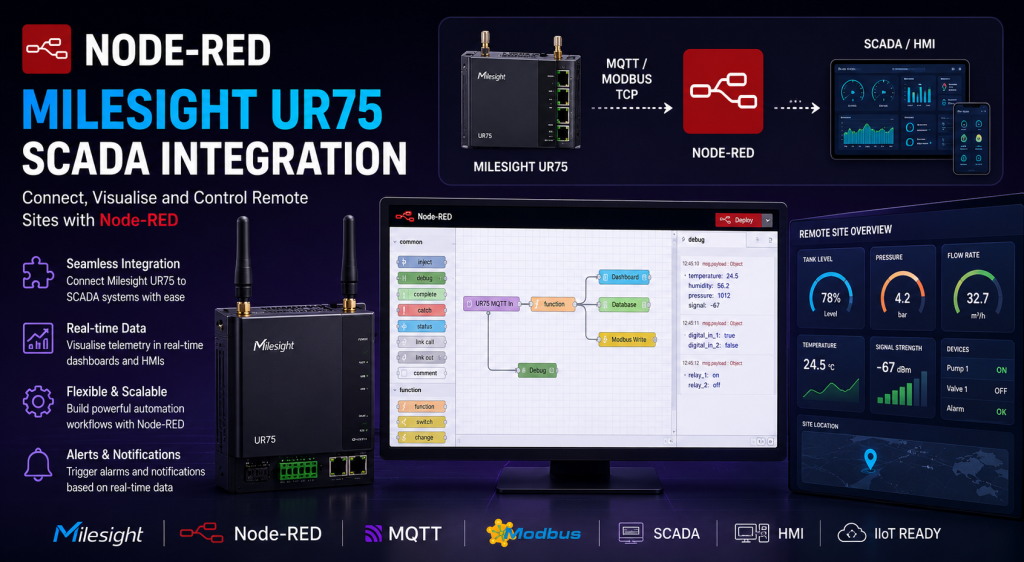
Node-RED on the Milesight UR75: Edge Logic for SCADA and Industrial IoT
The Milesight UR75 runs Node-RED natively via the Development Platform. No separate gateway. No Docker container. Just the router, a browser, and a flow editor ready to handle Modbus polling, MQTT bridging, and protocol conversion at the edge.
Most SCADA engineers deploying cellular connectivity think in terms of hardware layers: a PLC or RTU on the serial side, a router handling the WAN link, and a platform somewhere in the cloud or data centre doing the heavy lifting. The router is just a pipe.
The Milesight UR75 changes that. It ships with Node-RED built into the Development Platform, which means the router itself can do meaningful work on the data before it leaves the site. Poll Modbus registers, reformat the payload, filter out noise, bridge to MQTT, trigger alerts on threshold breaches – all running on the router, persistently, without a separate edge computing device in the cabinet.
This post covers how that works in practice: what Node-RED on the UR75 actually gives you, how to enable it, the use cases that make most sense for SCADA deployments, and where the limits are.
What the Milesight UR75 Brings to a SCADA Deployment
Before getting to Node-RED, it is worth understanding why the UR75 is the right base hardware for this kind of deployment.
Connectivity
- 5G Sub-6 GHz (NSA/SA) with 4G fallback
- Dual SIM – automatic failover between networks
- Wi-Fi 6 on -W2 variants
- 4 x Gigabit Ethernet LAN ports
- Optional PoE PSE (60W total, 4 ports)
Industrial interfaces
- RS232 and RS485 serial ports
- Modbus TCP/RTU master and slave
- Digital I/O (DI and DO)
- GPS/GNSS built in
- DIN rail mount, IP30, -40°C to +70°C
Edge computing
- Quad-core ARM Cortex-A55 at 2 GHz
- 1 GB LPDDR4 RAM
- Node-RED via Development Platform
- Python scripting also available
- Flows persist across reboots
Remote management
- Milesight Development Platform
- MilesightVPN for zero-config tunnel access
- Configuration push and firmware OTA
- Event-based alerting
- DeviceHub for legacy fleet management
The combination of RS485 serial, Modbus support, and a capable quad-core processor running Node-RED puts the UR75 in a different class from most cellular routers. You are not just moving data – you are processing it on the device before it leaves the site.
Node-RED on the UR75 – What It Is and How It Works
Node-RED is a flow-based programming environment originally developed by IBM for wiring together hardware, APIs, and services. It runs in a browser-based editor and lets you build logic by connecting nodes – each node performs a specific function, and data flows between them as messages.
On the UR75, Node-RED runs as part of the Milesight Development Platform. It is not a separate installation or a Docker container. Once the Development Platform connection is established, Node-RED is accessible from the platform interface and can be launched directly in the browser.
Key things to understand about how it works on the UR75:
- Flows are stored on the device and run locally – they do not depend on a cloud connection to execute
- Flows persist across device reboots
- Milesight provides custom nodes for reading serial data, accessing I/O pins, and interacting with the router’s own telemetry
- Additional nodes from the Node-RED library can be installed within the Development Platform editor
- Multiple flows can run simultaneously
- Read-only accounts can be added for monitoring without edit access
UR75 vs the rest of the Milesight range: Node-RED is only available on the UR75 (and the UF51 outdoor CPE). The UR32, UR32L, UR32S, UR35, and UR41 use Python 3.7 scripting instead, which is capable but different. If your deployment requires Node-RED specifically, specify UR75. If Python scripting is acceptable, the UR41 is a cost-effective alternative for lighter use cases.
Enabling Node-RED on the UR75
Node-RED is accessed through the Milesight Development Platform rather than directly through the router web GUI. The process is:
- Register the UR75 with the Milesight Development Platform using the authentication code from the router’s System menu
- In the Development Platform, navigate to the device and open the Node-RED editor
- The editor launches in the browser – the same Node-RED interface familiar to anyone who has used it before
- Build and deploy flows directly from the editor
The Development Platform handles remote access to the Node-RED instance, which means you can edit and monitor flows without needing a static IP on the router or a separate VPN configuration. MilesightVPN provides the secure tunnel that makes this work.
Practical SCADA Use Cases
These are the flows that make most sense for SCADA connectivity deployments on the UR75.
Modbus RTU to MQTT bridging
The most common use case. A PLC or RTU speaks Modbus RTU over RS485. The SCADA platform – whether Ignition, AVEVA, ThingsBoard, or something else – wants data over MQTT. Node-RED on the UR75 sits in between and handles the translation.
This eliminates the need for a separate protocol gateway device. The UR75 handles the Modbus side via its RS485 port and the MQTT side via the cellular or LAN connection.
Data pre-processing and noise filtering
Raw sensor data often contains noise, out-of-range values, or unnecessary chatter. Sending everything to the SCADA platform wastes bandwidth and clutters the historian. A function node in the flow can:
- Filter out readings outside an expected range before they leave the site
- Apply moving averages to smooth noisy analogue inputs
- Send data only when values change by more than a defined threshold (deadband filtering)
- Drop duplicate values where the reading has not changed
For deployments on constrained cellular links or where data costs matter, this pre-processing at the edge makes a measurable difference to data volume. The SCADA remote access guide covers the bandwidth implications of different polling strategies in more detail.
Threshold alerting without cloud dependency
A common failure mode in connected SCADA deployments is the alert that never fires because the cloud platform was unreachable when the threshold was breached. Node-RED on the UR75 can generate alerts locally and send them directly – over SMS via the router’s modem, or to an email endpoint, or to a webhook – without depending on the SCADA platform being reachable at that moment.
Protocol conversion for legacy equipment
Older industrial equipment often speaks protocols that modern SCADA platforms do not handle natively. Node-RED can act as a protocol converter – reading from a legacy serial protocol on the RS485 port, parsing the payload in a function node, and publishing the normalised data to MQTT or a REST API. This extends the useful life of legacy field equipment without requiring hardware replacement.
Connecting to SCADA platforms
Node-RED on the UR75 connects naturally to the main SCADA and IoT platforms:
| Platform | Connection method | Node available |
|---|---|---|
| ThingsBoard | MQTT with device credentials | Yes – node-red-contrib-thingsboard |
| Ignition (Inductive Automation) | MQTT via Cirrus Link MQTT Engine | Yes – standard MQTT nodes |
| AVEVA System Platform | REST API or MQTT broker | Standard HTTP/MQTT nodes |
| Schneider EcoStruxure | MQTT or REST | Standard HTTP/MQTT nodes |
| Custom platforms | MQTT, REST, WebSocket | Full node library available |
For Ignition specifically, the Cirrus Link MQTT modules are the standard integration path. The UR75 publishes data to an MQTT broker, Ignition’s MQTT Engine module subscribes, and the data appears in Ignition tags automatically. This is a clean architecture that keeps the SCADA platform decoupled from the field hardware.
The Milesight Range – Choosing the Right Model
Node-RED is exclusive to the UR75 within the Milesight cellular router range. If your deployment does not require Node-RED, the other models offer the same Development Platform with Python scripting instead.
| Model | Edge programming | Serial | 5G | Best for |
|---|---|---|---|---|
| UR75 | Node-RED + Python | RS232 + RS485 | Yes | SCADA edge processing, protocol conversion, complex flows |
| UR41 | Python only | RS232 + RS485 | No (4G) | Cost-effective M2M, simpler scripted logic |
| UR35 | Python only | RS232 + RS485 | No (4G) | Dual SIM failover, serial connectivity |
| UR32 | Python only | RS232 + RS485 | No (4G) | Entry-level M2M, budget-conscious deployments |
For SCADA deployments where Node-RED is the requirement, the UR75 is the only model to specify. For deployments where Python scripting is sufficient – scheduled data polling, simple threshold logic, basic formatting – the UR41 handles the same serial protocols at a lower price point and covers the majority of industrial M2M use cases.
Comparing with Node-RED on Teltonika Routers
The obvious comparison is with Node-RED on Teltonika RUTC-series routers, which use Docker as the runtime rather than a built-in environment. There are meaningful differences:
| Aspect | Milesight UR75 | Teltonika RUTC40/41/50 |
|---|---|---|
| Node-RED deployment | Built into Development Platform | Docker container |
| Setup complexity | Lower – enabled via platform UI | Higher – Docker image pull and config |
| Remote management | Development Platform + MilesightVPN | Teltonika RMS |
| Node installation | Via platform editor | Via Docker/npm inside container |
| Resource isolation | Shared with router OS | Containerised |
| Flexibility | Node-RED focused | Any Docker image possible |
The Milesight approach is simpler to get running and fits teams who want Node-RED without the Docker overhead. The Teltonika approach is more flexible – if you need other containerised applications alongside Node-RED, Docker gives you that option. For straightforward SCADA edge processing, the UR75’s built-in approach is easier to deploy and maintain.
Security Considerations
Running Node-RED on a device that also handles your SCADA connectivity introduces some security considerations worth addressing.
Node-RED flows can make outbound HTTP requests, post to external APIs, and interact with services outside the site network. In a SCADA context where network segmentation matters, you should:
- Use a private APN with a fixed IP rather than a public IP SIM – this keeps the device off the public internet and removes the attack surface from inbound connections
- Configure the UR75’s built-in firewall to restrict outbound traffic to known MQTT broker and SCADA platform endpoints only
- Use VPN (OpenVPN or IPsec) for all SCADA platform connections – the UR75 supports both as client and server
- Limit Node-RED editor access to authorised users only – the Development Platform supports read-only accounts for monitoring
- Review flows before deployment – a misconfigured HTTP request node could exfiltrate data unintentionally
MilesightVPN provides a managed zero-configuration tunnel for remote access to the router and to equipment behind it on the LAN side. For most SCADA deployments this is the right access model – no static IP required, all traffic tunnelled, no inbound ports open on the cellular interface.
Where Node-RED on the UR75 Has Limits
The UR75 is a capable edge device but it is not a server. Worth being clear about where the limits are:
- Flow complexity: Very large or computationally intensive flows may affect router performance. Keep flows focused on the task – polling, formatting, publishing – rather than building complex analytics pipelines
- Data storage: Node-RED on the UR75 does not have large local storage for buffering. For store-and-forward requirements where connectivity is intermittent, design the flow to handle reconnection gracefully rather than assuming persistent local storage
- Node library: Not every Node-RED node will install or run correctly in the UR75’s environment. Test before deploying at scale
- Not a replacement for a full SCADA platform: Node-RED on the UR75 is edge pre-processing. It complements ThingsBoard, Ignition, or AVEVA – it does not replace them
Practical sizing guidance: For most SCADA edge deployments – polling 10-20 Modbus registers, filtering, and publishing to MQTT – the UR75 handles the load comfortably alongside its routing functions. Where you are polling hundreds of registers at high frequency or running complex transformation logic, test the CPU headroom on a development unit before committing to the architecture.
Summary
The Milesight UR75 with Node-RED via the Development Platform is a genuinely useful combination for SCADA and industrial IoT deployments. It eliminates a hardware layer – the separate protocol gateway or edge computing device – and puts the logic where the data originates.
For teams already using Milesight hardware, the Development Platform makes Node-RED accessible without Docker expertise or complex configuration. For engineers evaluating edge processing options for new SCADA deployments, the UR75 is worth serious consideration alongside the Teltonika RUTC series.
The serial ports, Modbus support, dual SIM failover, and Node-RED runtime in a single DIN-rail device at an industrial temperature rating covers the majority of cellular SCADA connectivity requirements without needing anything else in the cabinet.