In Defence of the Public IP SIM: Why We Still Need Real IPv4 on Cellular, and Why the Risk Was Never the SIM
Nobody tells a business to refuse a public IP on its leased line. So why do we say it about a SIM? The address is the same. What changes is how carefully we treat it.
The other side of the argument
Yesterday I published the public IP SIM problem, a long look at how IPv4 scarcity and security pressure are pushing IoT fleets towards private addressing. I stand by it. For most telemetry and remote management, a private SIM with outbound remote access is the better design.
But I have been in this industry long enough to know that "never use a public IP SIM" is not good advice either. There are plenty of public IP SIM use cases where a real, non-NATed IPv4 address on a cellular connection is exactly the right tool, and some where nothing else will do. The more I thought about it, the more I realised the real problem is not the SIM at all. It is the public IP, and more precisely, how we treat it.
So this is the other half of the story: why we still use public IP SIMs in M2M, IoT and business cellular, what IP passthrough actually does, how to run one properly, and why I think the security conversation around cellular has drifted into blaming the wrong thing.
Contents
- Your office broadband already has one
- The attitude gap: same address, different care
- Real reasons people need a public IP on cellular
- IP passthrough: putting the real IPv4 on your firewall
- Starlink and the "how do I get a public IP" problem
- How to run a public IP SIM properly
- Closing the skills gap
- Frequently asked questions
Your office broadband already has one
Here is the thing that rarely gets said. Most business broadband and leased lines in the UK come with public IPv4 addresses, and nobody thinks twice. A business ordering a leased line expects a static block. A small office on fibre broadband usually has a public address on its router, whether it knows it or not. Nobody writes articles telling them to refuse it.
In fact the wired world is now going through exactly what cellular went through years ago. ISPreview's survey of UK alternative fibre networks, first published in April 2024 and updated in March 2025, found that many altnets now put consumer customers behind CGNAT by default. Most of them sell a static public IP back as an add-on, typically somewhere between £2 and £10 a month. In other words, fibre has arrived where mobile has been for years: shared addressing by default, a public IP if you ask and pay.
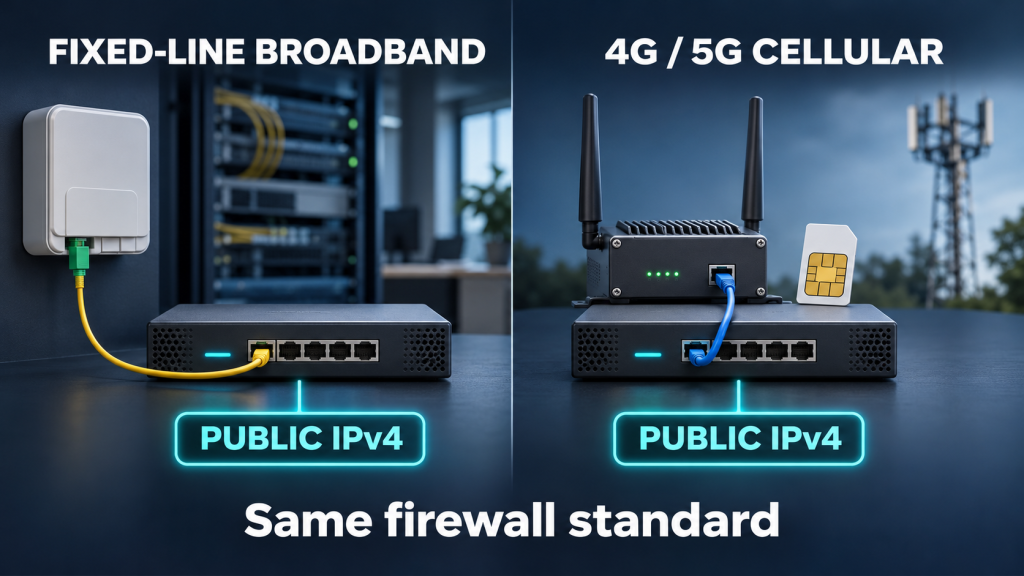
So the public IP on a SIM is not a special, dangerous kind of address. It is the same kind of address your office router has had for twenty years. A port left open on it is just as open whether the packets arrive over fibre or 4G. The risk lives in the address and the configuration behind it, not in the bearer.
Cellular is not inherently riskier than wired. A public IPv4 address with a careless configuration is risky on any connection. A public IPv4 address with a proper firewall is routine on any connection.
The attitude gap: same address, different care
If the address is the same, why does cellular have the reputation? I think it comes down to attitude, and how differently we buy and install the two.
When a business connects its office, the public IP goes onto a proper firewall. Somebody, an IT provider or an in-house engineer, configures it, and very often the business pays a few hundred pounds for it to be done properly. Inbound rules are thought about. VPNs are set up deliberately. Firmware is maintained because somebody is responsible for it.
Now compare the typical cellular install I have seen countless times. A router costing under £100, a public IP SIM because "that's how you get remote access", configured on site from a phone over Wi-Fi, with the job judged a success the moment the camera app loads. Nobody has been paid to think about the firewall. Nobody owns the firmware. The customer bought the cheapest connection that was easy to reach, and that is exactly what they got.
The address did not create that risk. The process did. And this is where I think some of the anti-public-IP advice goes wrong. Saying a flat "no" to public IP SIMs makes it sound as though the SIM is at fault, when the same person giving the advice is quite possibly working from home on a broadband line with a public IP and a router firewall they have never looked at. The problem is a skills and knowledge gap, not a SIM card.
Real reasons people need a public IP on cellular
These are the cases I come across again and again where a public IPv4 address on a SIM is a sensible choice, not a lazy one.
| Use case | Why a public IP helps |
|---|---|
| 4G or 5G backup into a business firewall | The firewall keeps its normal design: site-to-site VPNs, inbound rules and failover all work as they do on the primary line |
| Temporary or "pre-Ethernet" connectivity | A new site runs on cellular while the leased line is installed, then swaps over with no redesign |
| Site-to-site IPsec with a fixed peer | Many head ends and cloud VPN gateways expect the remote site to have a known, static public address |
| Inbound VPN to the router itself | Engineers connect to a VPN server on the router, which needs an address they can reach |
| Known-source inbound access | A monitoring centre, SCADA head end or alarm platform connects in from a fixed address |
| Legacy kit and protocols | Older PLCs, RTUs and recorders cannot run a VPN client and are polled from a central system |
| IP-authenticated services | SIP trunks and some partner systems authenticate by source IP rather than by username and password |
| Testing and diagnostics | Seeing the connection exactly as the internet sees it, without CGNAT getting in the way |
| Avoiding CGNAT side effects | No double NAT, no shared address picking up someone else's blacklisting |
4G and 5G backup into a firewall
This is the big one for business cellular. A company has a proper firewall with site-to-site VPNs to head office or the cloud. It adds a 4G or 5G router as a backup line. If the SIM is behind CGNAT, every inbound-dependent part of that design breaks the moment the firewall fails over: the VPN peers no longer recognise the site, inbound rules stop working, and somebody has to build a second architecture just for the backup line. With a public IP SIM and the router in IP passthrough, the firewall's WAN simply receives a real IPv4 address and carries on doing what it already does.
Pre-Ethernet and temporary sites
Anyone who has waited for a leased line knows the lead times can run to weeks or months. Construction site offices, new branches, pop-up retail and events all need to be working on day one. A public IP SIM into the same firewall that will later sit on the leased line means the site goes live with its final configuration, and the cutover is just a cable change.
VPNs that expect a known public address
Plenty of VPN designs still expect the remote end to have a fixed public address. AWS's Site-to-Site VPN, for example, asks for the IP address of the customer gateway device's external interface and says it must be static. If the device is behind NAT you give the NAT device's address instead and allow NAT traversal. That works when the NAT device is yours. When it is the mobile operator's CGNAT, the address is shared and can change, which is exactly what you do not want. Many traditional head-end concentrators are configured the same way, with each remote site defined by its fixed peer address.
Known-source inbound and legacy equipment
In utilities and industrial telemetry, the head end often polls the outstation, not the other way round. A SCADA master that connects in to a PLC every few minutes needs to reach it. Older RTUs and recorders frequently cannot run a VPN client at all. A public IP with inbound access locked to the head end's address is a perfectly reasonable design, and far better than ripping out working equipment.
IP-authenticated services
Some SIP trunk providers authenticate by public IP address rather than by registration. Gamma, for example, can authenticate a trunk against the customer's public IP address, according to DrayTek's configuration guide, although registration is also available. Partner systems that whitelist source addresses are similar. Strictly, those only need a fixed outbound address, which a VPS or provider gateway can also give you, but a public IP SIM is the simplest way to get one at a single site.
Testing
When I am testing a connection, a router or a service, I want to see it exactly as the internet does. Speed tests, port checks, VPN throughput and service validation all behave more predictably on a real public address, with no operator NAT in the path.
IP passthrough: putting the real IPv4 on your firewall
IP passthrough is what makes a cellular router behave like a modem. Instead of the router taking the public address and doing NAT itself, it hands the public IP straight to a chosen device on its LAN, usually the customer's firewall. Teltonika describes it as a way for a chosen local device to receive the public IP assigned to the router, bypassing NAT, and lists use cases including hosting servers, VPN endpoints and avoiding double NAT.
There are a few things to get right, and Teltonika's own description flags most of them:
- The router has no public address of its own. Its WAN typically holds no IP while the client device has it, so you manage the router from the LAN side, or through a vendor cloud platform.
- Tie it to the right device. Specify the firewall's MAC address. Without one, the public IP goes to the first device that asks for it.
- The firewall is now on the front line. Teltonika's words are that the receiving device is directly exposed to the internet. That is fine if it is a proper firewall configured as carefully as it is on the main line, and a problem if it is a PC or camera plugged in for a quick test.
- Expect a short drop on reconnect. When the mobile session restarts, the firewall's WAN renews its address. Make sure failover and VPN monitoring cope with that cleanly.
Done properly, passthrough is the cleanest way I know to make cellular a first-class business connection. The firewall does the security work, exactly as it does on fibre, and the cellular router just delivers the bearer.
Starlink and the "how do I get a public IP" problem
If you want proof that people still need public addresses, look at what has happened with satellite. Standard Starlink service puts customers behind CGNAT, so the address is shared, can change, and cannot accept inbound connections. A Northamptonshire Chamber of Commerce article from September 2025 summed up the business impact: site-to-site VPNs failing, CCTV, remote desktop and VoIP hard or impossible to reach, and whitelisting harder to maintain. Some higher Starlink tiers reportedly offer a public IPv4 option, but third-party guides describe it as public rather than static, so it can still change.
The internet is now full of people asking how to get a public IP on Starlink, on fibre altnets, and on mobile. These are not careless people. They are businesses with perfectly normal requirements, a VPN to head office, a phone system, a camera system, finding that the connection they bought cannot meet them. The answer for many is a fixed public IP, either on the connection itself or delivered through a tunnel to a hosted gateway. The demand for real public IPv4 has not gone away. It has simply moved to whichever connection cannot provide it.
How to run a public IP SIM properly
The good news is that a safe public IP SIM is not complicated. The pattern I recommend for most installs is simple: expose one thing, a VPN, and nothing else. Engineers reach the router and the equipment behind it through the tunnel, so the convenience of remote access stays and the attack surface shrinks to a single, well-designed service.
- Default deny inbound on the WAN. Check the firewall zone policy for the mobile WAN rejects unsolicited inbound traffic.
- Keep management off the WAN. Teltonika ships remote SSH, HTTP and HTTPS access from the WAN disabled by default, with a warning to use them only with strong passwords. Leave them off.
- Open only the VPN port. One rule allowing WireGuard, OpenVPN or IPsec to the router, nothing else.
- Restrict the source where you can. If the people or systems connecting have fixed addresses, allow only those. It is the single most effective rule you can add.
- No port forwards to LAN devices. Cameras, PLCs and recorders are reached through the tunnel, never published directly.
- Change the default password. Teltonika prints the default on the device label. Replace it with a strong, unique password and store it properly.
- Patch and monitor. Keep firmware current and use a management platform or alerts so somebody notices when something changes.
- Check IPv6 separately. If the APN hands out IPv6, apply the same default deny to the IPv6 firewall.
In firewall terms, the whole inbound policy for a typical site comes down to this:
WAN zone input: REJECT (default)
Allow: UDP 51820 (WireGuard) to router, from head office IP only
Allow: nothing else
Router WebUI, SSH: LAN and VPN only
Port forwards: none
That is the configuration a business would expect on its office firewall, applied to a cellular router. It takes a competent installer a few minutes. For a much fuller checklist, see how to secure a public IP cellular router and the wider cellular router security guide.
Would you accept this configuration on the office firewall? If the answer is no, it is not acceptable on a cellular router with a public IP either. The bearer does not change the standard.
Closing the skills gap
None of this contradicts the case for private addressing. If a device only needs to send telemetry and be managed occasionally, a private SIM with outbound remote access is simpler and safer, and I would still choose it. The private vs public IP guide sets out that choice in detail.
What I object to is the framing. "Never use a public IP SIM" treats the SIM as the problem and lets the real problem, an unconfigured device on a public address, off the hook. The UK's cyber security agency is clear that internet-exposed systems and edge devices are being targeted, and its advice is about exposure and configuration, not about which bearer delivers the packets.
The fix is professional practice. Treat a public IP SIM the way you would treat a leased line: commission it, document the firewall, own the firmware and charge for doing it properly. Installers who learn to deliver a hardened, VPN-only public IP install have a genuinely valuable skill. Customers who understand that a few hundred pounds of proper configuration is cheaper than an incident will pay for it. And suppliers who sell public IP SIMs could do far more to ship them with a safe default and a one-page setup guide.
The address was never the enemy. Careless configuration is, on any connection.
For the economics and history behind all this, read the public IP SIM problem. If you are new to the subject, start with what is a public IP SIM card. And if you install CCTV on Three, our piece on 3internet and public IPs in the VodafoneThree era is worth a read.
Frequently asked questions
What is IP passthrough on a 4G or 5G router?
IP passthrough hands the public IP address from the mobile network straight to a device on the router's LAN, usually a firewall, instead of the router doing NAT itself. The firewall's WAN port then holds the real public IPv4 address, just as it would on a leased line, and the router is managed from the LAN side.
Is a public IP SIM less secure than broadband with a public IP?
Not inherently. A public IPv4 address is equally reachable whether it arrives over fibre or 4G. The difference is usually in how carefully the connection is configured. A public IP SIM behind a properly configured firewall is no riskier than a business broadband line with the same setup.
Can I use a public IP SIM for 4G or 5G backup on my firewall?
Yes, and it is one of the best uses for one. Put the cellular router into IP passthrough so the firewall's backup WAN receives the public IP. Site-to-site VPNs, inbound rules and failover then work on the backup line as they do on the primary connection.
How do I allow only VPN access on a public IP SIM?
Set the WAN firewall to reject unsolicited inbound traffic, keep router management off the WAN, and add a single rule allowing your VPN port, ideally only from known source addresses. Reach the router and everything behind it through the tunnel, with no port forwards to LAN devices.
Does Starlink give you a public IP address?
Standard Starlink service uses CGNAT, so you do not get your own public IPv4 address and inbound connections do not work. Some higher tiers reportedly offer a public IPv4 option, but it is not described as static, so check the current plan terms before relying on it.
Why do some VPNs and SIP trunks need a known public IP?
Some VPN gateways identify each remote site by its fixed public address, and some SIP providers authenticate trunks by source IP instead of a username and password. Behind CGNAT the address is shared and can change, so those designs break. A public or fixed IP gives them the stable address they expect.